
Ways to compare prices online for UK shoppers

The fastest approach for most UK shoppers is a three-tool system: run a quick search-first comparison, add the item to a price tracker or wishlist, then apply a coupon or cashback layer at checkout. That combination covers the three moments where money is most commonly left on the table.
Three methods to try right now:
- Run a comparison search. Type the product name into Google Shopping or a dedicated comparison site to see prices from multiple retailers in one view.
- Add it to a price tracker or wishlist. If you can wait a few days or weeks, tracking the item lets you buy at the right moment rather than the first available one.
- Use a checkout extension. A browser extension that tests voucher codes or activates cashback takes seconds and costs nothing.
Pro Tip: If you’re buying a gift and can wait, adding items to a shared wishlist like WantThis is the single highest-value move. It centralises your checks, tracks price drops across 30+ UK retailers, and stops friends and family buying duplicates.
Table of Contents
- What are the best ways to compare prices online right now?
- Which types of price-comparison tools exist and when is each one best?
- Why do price trackers and wishlists often save the most money?
- How do browser extensions and cashback tools work at checkout?
- When should you use voucher codes and sale timing to save more?
- Always compare total cost, not just the sticker price
- How do you know if a price is genuinely a good deal?
- Common mistakes to avoid when comparing prices online
- Which method should you use for your situation?
- Key takeaways
- The case for doing less, more consistently
- WantThis: a practical starting point for UK price tracking
- Useful sources for further reading
What are the best ways to compare prices online right now?
Seven methods, ordered from fastest to most thorough. Pick the one that matches how much time you have.
-
Single-search comparison (fastest). Search the product name in Google Shopping or a price-comparison site. You’ll see a ranked list of retailers with current prices in under a minute. Best for: items you need today.
-
Multi-tab manual check. Open the product page on three to five retailers you trust, compare the final prices including delivery, and buy from the cheapest. Slower, but useful when comparison sites don’t index a specialist retailer you prefer.
-
Marketplace filter search. On Amazon or eBay, filter by “new” condition and sort by price. Useful for electronics and books where multiple sellers list the same item. Watch for seller ratings and delivery times.
-
Barcode or QR scan. Point your phone camera at a product’s barcode in a physical shop using a scan-and-compare app. Handy for deciding whether the in-store price is worth paying or whether you should order online. Mobile commerce growth means more apps now support this natively.
-
Price tracker or wishlist. Add the item to a tracker and set a target price. You’ll receive an alert when the price drops, rather than checking manually every few days. Best for: planned purchases and gifts.
-
Browser extension with coupon finder. Install an extension that automatically tests discount codes at checkout. Takes seconds and often surfaces codes you wouldn’t find by searching. Kiplinger’s curated list of deal tools highlights these as among the most consistently useful for everyday shoppers.
-
Cashback portal. Visit a cashback site before clicking through to a retailer. The percentage back varies by retailer and category, but it stacks on top of any sale price or voucher code you’ve already found.
Timing tip: Methods 1–3 suit urgent purchases. Methods 4–7 reward patience. If you’re buying a gift for an occasion that’s weeks away, combining methods 5 and 7 (track + cashback) usually produces the lowest total price.
Which types of price-comparison tools exist and when is each one best?
Understanding the tool categories helps you pick the right one for the job rather than defaulting to whichever you used last.
Search-first comparison engines
These index prices from hundreds of retailers and display them in a ranked list. Google Shopping is the most widely used in the UK, and MoneySavingExpert recommends it as consistently effective for finding low prices. The limitation is coverage: not every retailer pays to be listed, so niche or independent shops may not appear.
Dedicated price-comparison sites and apps
Sites built specifically for price comparison tend to have deeper product databases and better price-history features than a general search engine. They often include alert tools and historical charts. Coverage varies by category: electronics and appliances tend to be well covered; handmade goods or small-batch products less so. Choosing between them is best done by checking whether they index the retailers you actually buy from, not by counting features.
Marketplaces with aggregated seller listings
Amazon, eBay, and similar platforms show prices from multiple sellers on a single product page. This is useful for commoditised items, but the “lowest price” may come from a seller with slow delivery or a poor returns policy. Always check the seller’s rating and fulfilment method before buying.
Barcode and scan apps
Designed for in-store use, these let you scan a product and see online prices instantly. As mobile commerce continues to grow, scan-and-compare functionality is increasingly built into retailer apps and general shopping apps rather than requiring a separate download.
AI deal-finder tools
A newer category that can suggest alternatives or find deals when you don’t have a specific model in mind. Useful for discovery; less reliable for tracking an exact item over time. Price trackers remain the better choice once you know exactly what you want.
UK-specific notes:
- Some comparison engines have stronger coverage of UK-only retailers (Argos, Currys, John Lewis) than others built primarily for US or European markets.
- Delivery costs and membership discounts (such as Amazon Prime) can shift which retailer is cheapest. A comparison engine that shows only the sticker price can mislead you.
- VAT is included in UK retail prices by law, so you don’t need to add it yourself, but cross-border purchases from non-UK sellers may attract import duties.
Why do price trackers and wishlists often save the most money?
A one-off comparison search tells you the best price right now. A price tracker tells you whether right now is actually a good time to buy.
How trackers work
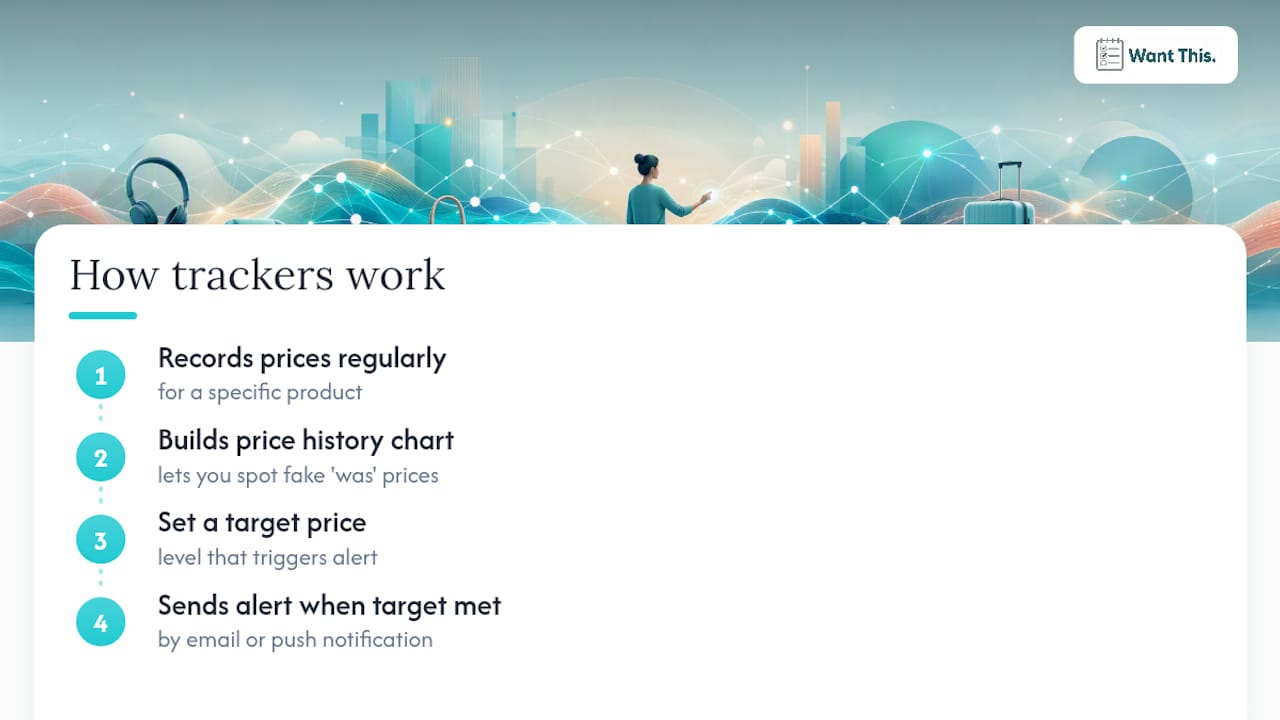
A tracker records the price of a specific product at regular intervals and builds a history chart. When the price drops to a level you’ve set as your target, it sends you an alert by email or push notification. That history chart is also what lets you spot a “sale” price that’s actually the item’s normal price with a temporary inflated “was” figure attached.
Why wishlists add an extra layer
A wishlist does everything a tracker does, but also organises items by occasion, lets you share the list with friends and family, and prevents duplicate purchases. For gift-buying, that coordination function is as valuable as the price data. WantThis’s price-tracking feature covers 30+ UK retailers, pulls in the product title, image, and current price automatically when you paste a link, and sends alerts when the price drops. Friends and family can privately reserve or mark items as bought so surprises stay intact.
Practical setup steps:
- Paste the product URL into your tracker or wishlist.
- Set a target price based on the lowest price shown in the history chart, not the current price.
- Decide your deadline: if you need the item by a specific date, set a reminder to buy regardless of price a week before.
- For gifts, share the list so others can see what’s needed without duplicating.
Feature checklist when choosing a tracker:
- Covers the UK retailers you actually use
- Shows a price-history chart (not just the current price)
- Sends reliable alerts by email or app notification
- Makes it easy to add items on the go, on your phone as well as your computer
- Supports list sharing if you’re coordinating gifts
Pro Tip: Use a tracker for items you can wait on, and a quick comparison search for things you need today. Pairing both means you’re never paying full price for a planned purchase and never wasting time tracking something you need urgently.
How do browser extensions and cashback tools work at checkout?
These tools sit at the end of your shopping workflow and apply savings you might otherwise miss.
What browser extensions do
A checkout extension monitors the page you’re on and, when you reach a retailer’s checkout, automatically tests available voucher codes and applies the best one. Some also display a price comparison panel showing whether the same item is cheaper elsewhere. The best deal-finding tools group these into coupon apps, cashback activators, and price-overlay tools, each with a slightly different function.
How cashback portals work
A cashback site acts as a referral layer between you and the retailer. You click through to the retailer from the cashback site, and when you complete a purchase, the retailer pays the cashback site a commission, part of which is passed back to you. The cashback rate varies by retailer and product category. The key point: you need to start your session from the cashback site for the tracking to work. If you navigate away or use a different tab, the tracking may break.
Privacy and security considerations:
- Browser extensions request access to your browsing data. Read the permissions before installing and prefer extensions from well-known providers with clear privacy policies.
- Avoid installing multiple coupon extensions simultaneously; they can conflict and occasionally apply incorrect codes.
- Stick to extensions listed in the Chrome Web Store or Firefox Add-ons with substantial user reviews.
Pro Tip: Stack your savings in this order: (1) run a comparison to find the cheapest retailer, (2) check whether a price tracker shows a better price is likely soon, (3) apply a voucher code at checkout, (4) activate cashback before you click “buy”. Skipping step 1 and going straight to a coupon extension means you might be saving 10% on a price that’s already 20% higher than a competitor.
When should you use voucher codes and sale timing to save more?
Knowing when UK retailers discount predictably is as useful as any tool.
UK sale calendar to plan around:
- January sales: Most major UK retailers discount heavily in the first two weeks of January, continuing from Boxing Day.
- Boxing Day (26 December): Traditionally the biggest single-day sale event for UK shoppers, particularly for electronics and home goods.
- Black Friday and Cyber Monday (late November): Now the largest promotional period of the year for online shopping in the UK. Price history is especially important here because some retailers inflate “was” prices in the weeks before. WantThis’s Black Friday price tracker guide explains how to spot genuine deals versus manufactured discounts during this period.
- Easter and bank holiday weekends: Smaller promotional peaks, particularly for home, garden, and DIY categories.
- End-of-season fashion sales: Typically late June to July (summer) and late December to January (winter). If you’re refreshing your wardrobe on a budget, these windows are worth planning for.
Finding and testing voucher codes:
- Check the retailer’s own newsletter first. Sign-up discounts (typically 10–15% off a first order) are often the best single-code saving available.
- Use a voucher aggregator site to find current codes, but test them before assuming they work; many listed codes are expired.
- Some codes are single-use or account-specific and won’t work if shared publicly.
Should you wait for a sale or buy now?
- If the price history shows the item has been at this price for several months, waiting is unlikely to help unless a known sale event is approaching.
- If stock is limited or the item is newly released, waiting risks it selling out.
- For gift purchases with a fixed deadline, set a target price and a “buy regardless” date rather than waiting indefinitely.
Always compare total cost, not just the sticker price
The cheapest listed price is not always the cheapest final price. MoneySavingExpert’s guidance and NerdWallet’s shopping tips both emphasise that delivery charges, membership discounts, and returns policies can flip which retailer is actually cheapest.
Checklist of costs to include in every comparison:
- Item price (including any size or configuration uplifts)
- Delivery charge (standard vs express; free threshold)
- Returns cost (free returns vs paid; collection vs drop-off)
- Warranty length and terms (manufacturer vs retailer)
- Membership or subscription discounts (Prime, Clubcard, Nectar)
- Any applicable import duties for non-UK sellers
Verifying seller reputation quickly:
- Check the seller’s rating on the marketplace (aim for 95%+ positive feedback with a substantial number of reviews).
- Confirm the returns window (14 days is the UK legal minimum for online purchases; 30 days is standard for reputable retailers).
- Look for a UK contact address or phone number. PayPal’s consumer guidance recommends checking reviews and policies before completing any purchase, particularly from unfamiliar sellers.
- For marketplace sellers, check whether the item is fulfilled by the marketplace (faster, easier returns) or directly by the seller.
How do you know if a price is genuinely a good deal?
A low price and a good deal are not the same thing. The difference is context, and price history provides it.
Reading a price-history chart
A price-history chart plots the item’s price over time. A genuine deal looks like a price that has dropped below its typical range. A manufactured discount looks like a price that was artificially raised for a few weeks before a “sale” and then returned to its normal level, labelled as a saving.
Behavioural-economics research, including work by Dan Ariely, shows that anchoring effects make shoppers perceive a price as a bargain simply because a higher “was” figure appears next to it, regardless of whether that higher price was ever the genuine market rate. Knowing this makes the price-history chart a practical defence, not just a nice-to-have.
Common fake-discount patterns
Price verification record (template):
| Date checked | Price | Retailer | Promotion active? | Notes |
|---|---|---|---|---|
| 1 Nov | — | Retailer A | No | Baseline price |
| 15 Nov | — | Retailer A | No | Price raised |
| — | — | Retailer A | Black Friday | “40% off” claim |
| 30 Nov | — | Retailer A | No | Back to baseline |
In this example, the “40% off” claim is measured against an inflated pre-sale price, not the genuine baseline.
Pro Tip: Three to four weeks of price history is usually enough to judge whether a deal is real. If the item has only been tracked for a few days, the chart can’t tell you much. Add items to a tracker well before a sale event, not during it.
Common mistakes to avoid when comparing prices online
Even experienced shoppers make these errors. Spotting them early saves both money and time.
Frequent mistakes:
- Comparing sticker prices only. Delivery and returns costs regularly flip the result, as the cost checklist above shows.
- Chasing tiny savings that cost significant time. Spending 45 minutes to save £1.50 is a poor trade. Set a minimum saving threshold before you start comparing.
- Trusting a single source. One comparison site may not index all relevant retailers. Cross-check with a second source for high-value purchases.
- Ignoring seller quality for the sake of price. A marginally cheaper price from an unverified marketplace seller can cost more in time and stress if the item arrives late, damaged, or not at all.
- Over-comparing to the point of paralysis. Stanford research shows that asking consumers to compare options can reduce their likelihood of buying at all. Set a comparison limit: check two or three sources, then decide.
Red-flag seller behaviours:
- Delivery times that are implausibly fast (next-day from an overseas seller with no UK warehouse).
- No returns policy listed, or a returns window shorter than 14 days.
- Prices that are dramatically below every other retailer for the same item in the same condition.
- Pressure tactics such as countdown timers that reset when you reload the page.
Quick rules:
- Always check the final checkout price, not the product-page price.
- Read the returns policy before buying, not after.
- If a deal looks too good to be true, check the seller’s reviews on an independent platform before proceeding.
Which method should you use for your situation?
The right approach depends on three things: how urgently you need the item, whether you’re buying for yourself or as a gift, and how much the price matters relative to your time.
-
Urgent purchase, any category. Run a Google Shopping search, check the top two or three results including delivery, apply a checkout extension for any available codes, and buy. Total time: under five minutes.
-
Planned purchase, can wait weeks. Add the item to a price tracker or wishlist, set a target price based on the price-history low, and wait for an alert. Check whether a known sale event (Black Friday, January sales) falls within your window before setting your target.
-
Buying a gift for someone else. Add the item to a shared wishlist on WantThis. Share the list with anyone who might be buying. They can see what’s needed, reserve items privately, and you’ll receive a price-drop alert if the price falls before the occasion. This workflow is covered in more detail in how consumers find deals with wishlists.
-
Frequently discounted item (electronics, appliances, fashion). Check the price history first. If the item discounts regularly, waiting for the next cycle is usually worth it. For fashion specifically, dressing well while spending less often comes down to buying end-of-season rather than in-season.
-
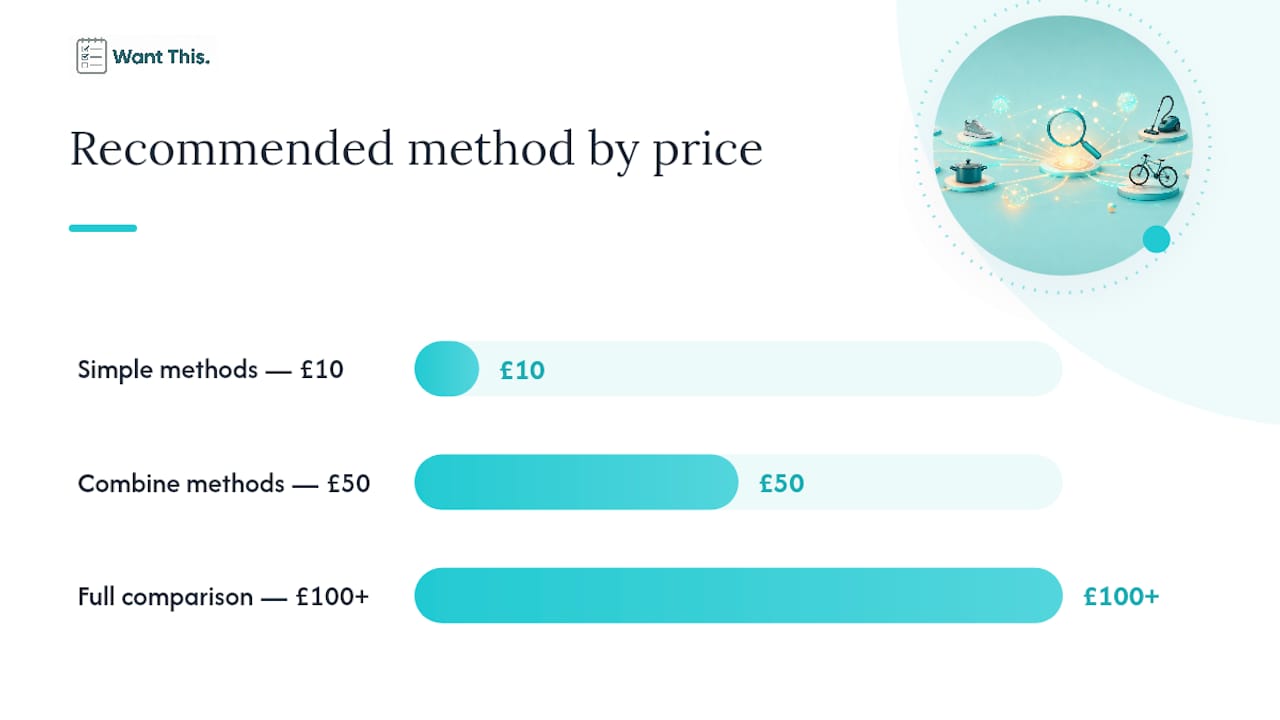
High-value purchase (over £100). Use a full comparison: check two comparison sites, verify the seller’s reputation, calculate the total landed cost including delivery and returns, and activate cashback before checkout. The extra ten minutes is proportionate to the saving available.
-
Unsure what to buy. An AI deal-finder or a curated deals aggregator is useful here. Once you’ve narrowed to a specific model or product, switch to a price tracker for the final decision.
Combining methods: For most planned purchases, the optimal sequence is: comparison search (to establish the market price) → price tracker (to time the purchase) → voucher code + cashback (to reduce the checkout price). You don’t need all three for a £10 purchase, but for anything over £50, the combination is worth the small setup time.
Key takeaways
The most effective way to compare prices online is to use a small, consistent toolkit: one comparison search to find the market price, one price tracker or wishlist to time the purchase, and a checkout savings layer to reduce the final cost.
| Point | Details |
|---|---|
| Use a three-tool system | Combine a comparison search, a price tracker, and a checkout extension for the lowest total price. |
| Compare total cost, not sticker price | Delivery, returns, and membership discounts regularly change which retailer is cheapest. |
| Check price history before trusting a “sale” | A price-history chart reveals whether a discount is genuine or manufactured against an inflated “was” price. |
| Match the method to your urgency | Urgent purchases suit a quick comparison; planned or gift purchases benefit from tracking and shared wishlists. |
| WantThis for gift tracking | WantThis tracks prices across 30+ UK retailers, sends drop alerts, and lets friends reserve items privately to avoid duplicates. |
The case for doing less, more consistently
There’s a tendency to treat price comparison as a task that rewards effort: the more sites you check, the more you save. That’s true up to a point, and then it stops being true. Stanford’s research on comparison behaviour found that prompting consumers to compare can actually reduce their willingness to buy, which is a real cost if you end up missing a genuinely good price because you were still checking.
The shoppers who consistently save the most aren’t the ones who check the most sites. They’re the ones who set up a repeatable system and let it run. Add items to a wishlist when you first think of them. Set a realistic target price based on history, not hope. Let an alert tell you when to act. That approach takes only a few minutes to set up and then runs in the background.
The other thing worth saying: the biggest savings rarely come from coupon codes. They come from timing. Buying a television in late November rather than October, or a coat in July rather than September, can save far more than any voucher code. Price history is what makes timing visible. Without it, you’re guessing.
For gift-buying specifically, the coordination problem is often bigger than the price problem. A shared wishlist that prevents three people buying the same thing, and that tracks whether prices have dropped before the occasion, solves both at once. That’s the practical case for using WantThis’s wishlist and sharing features rather than a collection of separate tools.
WantThis: a practical starting point for UK price tracking
If you’re looking for a single tool that handles the tracking and coordination side of price comparison, WantThis is built specifically for UK shoppers. Paste any product link from any UK retailer and WantThis pulls in the title, image, and current price automatically. From there, the price-tracking feature monitors the item across 30+ UK retailers and sends you an alert when the price drops.

For gift-buying, the shared wishlist function means friends and family can see what you want, reserve items privately, and avoid duplicates without spoiling any surprises. It works in any phone or desktop browser, so you can add items while you browse, and there’s a Secret Santa organiser with an automatic draw for group gifting occasions.
The workflow is straightforward: find an item you want, add it to your WantThis list, and share the list with anyone who might be buying for you. When the price drops, you’ll know. Start your free wishlist on WantThis and put your price tracking on autopilot.
Useful sources for further reading
- Asking consumers to compare may have unintended results — Stanford Graduate School of Business
- statista.com
- 22 Best Deals Sites to Find the Best Prices When Online Shopping | Kiplinger
- Cheap online shopping: price comparison & tricks — MSE
- Best Ways to Find Deals Online in 2026 (Free Tools)
- How to Find the Best Deals Online — NerdWallet
- How to Find Online Shopping Deals | PayPal US