
How to keep gifts secret: a buyer’s quick guide

TL;DR:
- Using private browsing, rerouting notifications, and private wishlists helps keep gift purchases secret. Digital tools like smart speakers and synced accounts often unintentionally reveal surprises, so precautions must be taken beforehand.
The fastest way to keep gifts secret as a buyer is to combine three things: shop in a private browser window, route all delivery notifications to a separate email address, and use a private wishlist tool like WantThis so other buyers can reserve items without anyone browsing your retailer account. Those three steps close the most common tells in one go. Smart speakers, synced browser histories, and shared Amazon accounts are the usual culprits when a surprise unravels, not deliberate snooping. WantThis lets you share a private gift list with family and friends, where they can mark items as bought without the recipient ever seeing what’s been reserved.
Quick actions you can take right now:
- Open an incognito or private browser window before searching for any gift
- Change your Amazon order notification email to a personal address the recipient never checks
- In the Alexa app, go to Settings > Notifications > Amazon Shopping and turn off delivery update titles
- Create a private list on WantThis and share it only with the buyers who need to see it
Table of Contents
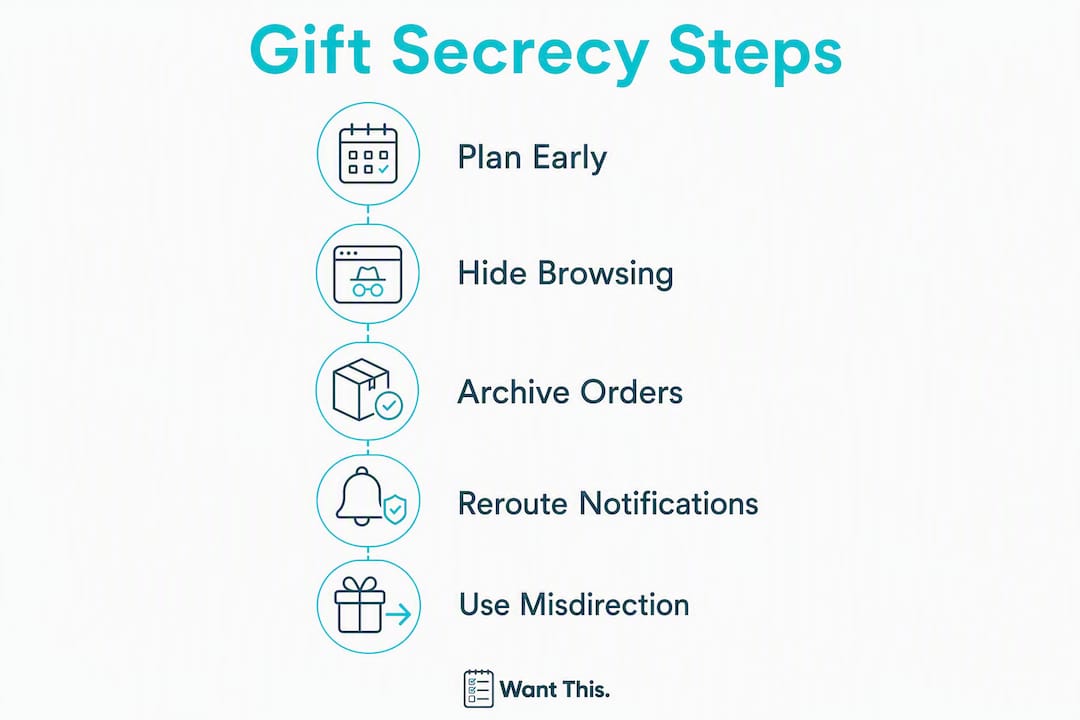
- Ten steps to keep gifts secret as a buyer right now
- How do you hide browsing and search traces on your devices?
- What Amazon settings help you hide orders and wishlists?
- How do you stop delivery notifications and billing traces from revealing a gift?
- Misdirection and physical hiding: how to protect the surprise in person
- How WantThis helps UK buyers keep gifts private and surprises intact
- Key takeaways
- Why most gift surprises fail (and what actually fixes them)
- Keep surprises safe with WantThis
- Further reading and sources
Ten steps to keep gifts secret as a buyer right now
Follow these in order. Most take under two minutes; a couple need a small amount of planning.
-
Open a private or incognito window before you search for any gift. This stops the browser saving local history, cookies, and site data that feed personalised ads on shared devices.
-
Sign out of synced accounts on any shared device before browsing. Browser sync preserves traces across phone, tablet, and desktop, so clearing history on one device alone won’t remove it from others logged into the same account.
-
Clear targeted search history from any retailer or search engine you used before you remembered to go incognito. Go to your Google account’s My Activity page, or the retailer’s browsing history section, and delete specific product searches.
-
Archive the order on Amazon once you’ve placed it. This removes it from the default ‘Your Orders’ view. Bear in mind it doesn’t delete the record entirely — more on that limitation in the Amazon section below.
-
Change the notification email for the order to a private address the recipient doesn’t have access to. Do this in your account’s communication preferences before the order ships.
-
Disable smart speaker delivery announcements. In the Alexa app: Settings > Notifications > Amazon Shopping, then toggle off the option that reads delivery update titles aloud.
-
Turn off shopping notifications on your phone. Go to your device’s notification settings and mute alerts from retailer apps so a banner doesn’t flash up on a shared or unlocked screen.
-
Pay with a gift card or separate card if the recipient ever glances at your bank statements. A retailer gift card or a prepaid card keeps the purchase off your main statement entirely.
-
Choose click-and-collect or a locker as your delivery address. Picking up from an Amazon Locker or a third-party collection point removes the risk of a parcel arriving at home when the recipient is there.
-
Move the parcel off-site on delivery. If it does arrive at home, take it to a trusted friend’s house, your workplace, or a storage unit until you’re ready to wrap it.
Pro Tip: Order early. Last-minute same-day delivery is the hardest to hide because you have almost no time to reroute notifications, arrange collection, or sort payment. Buying well ahead of time gives you room to manage every step without rushing.
Pro Tip: Before assuming your traces are gone, check every device logged into your browser account — phone, tablet, and laptop. Clearing history on one does nothing to the others unless you disable sync entirely.
How do you hide browsing and search traces on your devices?
Private or incognito browsing prevents the browser from saving local history, cookies, and site data, which is why it reduces the chance of gift searches appearing in personalised ads on a shared device. What it doesn’t do is stop account-level history or browser sync.
Browser-specific steps
- Chrome: Open an incognito window with Ctrl+Shift+N (or Cmd+Shift+N on Mac). Sign out of your Google account in that window too, otherwise your search history still syncs to your account. To disable sync entirely, go to chrome://settings/syncSetup.
- Safari on iPhone/iPad: Tap the tabs icon, then tap ‘Private’ to open a private tab. Note that iCloud Safari history syncs across all devices signed into the same Apple ID, so also check Settings > [Your Name] > iCloud > Safari and consider toggling it off temporarily.
- Android: Use Chrome incognito or switch to Firefox Focus, which blocks tracking by default and doesn’t retain history.
Messaging and photos
Delete or unsend any messages where you discussed the gift. On iMessage (iOS 16 and later), press and hold a message to unsend it within two minutes of sending. On WhatsApp, you can delete a message for everyone within 60 hours of sending. Move any gift photos to a hidden or locked album on your device so they don’t appear in the main camera roll.
Warning: Incognito mode only protects local history on that device. If you’re signed into Google, Amazon, or any retailer, your searches and views are still logged to your account and can appear on any other device signed in with the same credentials. Sign out of accounts before browsing, or use a completely separate browser profile.
Pro Tip: Check family sharing settings on both Apple and Google accounts. Shared family plans sometimes surface purchase history or app activity to other members without you realising.
What Amazon settings help you hide orders and wishlists?
Amazon is where most UK shoppers run into trouble, because the account is often shared or visible on a family device. Two settings make the biggest difference immediately.
Archiving orders
Archiving an order moves it out of the default ‘Your Orders’ view. To do it: go to Your Orders, find the order, select ‘Archive Order’. The order disappears from the main list. However, archiving is a visual hide rather than a deletion — anyone who knows to look in ‘Archived Orders’ under account settings can still find it. Secure your account with a strong password and, if you share an Amazon Household, consider whether the other member has full account access.
The ‘Don’t spoil my surprises’ wishlist toggle
Amazon wishlists include a ‘Don’t spoil my surprises’ setting that keeps purchased items appearing as ‘Unpurchased’ to the list owner. This is particularly useful for registry-style lists. Check it’s enabled in your list’s Manage List settings, because it isn’t always on by default.
Other Amazon steps worth checking
- Amazon Household: Set up separate profiles so purchases on your profile aren’t visible to other household members by default.
- Communication preferences: Change the email address for order updates to a private account the recipient doesn’t access.
- Notification settings: Disable SMS and push notifications for order updates so they don’t appear on a shared device.
General checklist for other UK retailers
Most major UK retailers offer at least some of these controls. Before you order, look for:
- A wishlist or registry privacy toggle (public, shared, or private)
- An option to hide or archive past orders
- Guest checkout, which keeps the purchase off your main account history entirely
- Gift options at checkout, including gift wrapping and a gift receipt that omits the price
- Click-and-collect or locker delivery to a location the recipient won’t visit
For platform-specific privacy flows, the WantThis guide to sharing gift lists covers how to coordinate multiple buyers without exposing individual purchases.
How do you stop delivery notifications and billing traces from revealing a gift?
Delivery notifications are one of the most overlooked tells. A push notification reading “Your [product name] has shipped” on a shared phone screen can undo weeks of careful planning in a second.
Rerouting notifications
Change the contact details for delivery updates before the order ships. On Amazon, go to Account > Communication Preferences and update the email. For other retailers, check your order confirmation email for a ‘manage preferences’ link, or log into your account and update contact details in the notifications section. Use an email address the recipient has no access to, ideally one you created specifically for gift purchases.

Alexa announces delivery updates aloud, including the product title, unless you turn it off. The setting is in the Alexa app: Settings > Notifications > Amazon Shopping, then toggle off ‘For items in delivery updates’. Do this before the order ships, not after.
Billing and payment workarounds
- Retailer gift cards: Buy a gift card with cash or a card the recipient doesn’t see, then use it to pay for the gift. The transaction on your main statement shows only the gift card purchase, not the product.
- Prepaid or virtual cards: Services like Revolut or Monzo allow you to create virtual cards or separate pots, keeping the purchase off your main account view.
- Pay at collection: Some retailers allow payment in store at the collection point, which keeps the transaction off any online account entirely.
- Separate card: If you have a card the recipient never sees, use it for gift purchases during the run-up to birthdays or Christmas.
Timeline and cost trade-offs
Express delivery and gift-wrapping add cost, but they’re sometimes worth it for last-minute purchases. The real trade-off is time: same-day delivery gives you almost no window to reroute notifications or arrange an alternate collection point. Ordering one to three weeks early means you can set up a locker delivery, change notification emails, and sort payment without any of it feeling rushed. Gift wrapping from the retailer also means the parcel arrives in neutral packaging, which reduces the chance of the recipient guessing the contents from the box shape.
Misdirection and physical hiding: how to protect the surprise in person
Digital precautions cover the online trail, but a parcel sitting in the hallway or a browser tab left open on the family laptop can undo all of it. Physical tactics remain important because even secure digital hiding can fail if the package itself is discoverable at home.
Storage and packaging
- Off-site storage: Arrange delivery to your workplace, a trusted friend’s house, or an Amazon Locker. Collect it yourself and bring it home only when you can store it safely.
- Disguise the packaging: Repack the item in an unbranded bag or box if the original packaging is recognisable. A large branded retailer bag left in a wardrobe is an obvious tell.
- Lockable storage: A lockable box, suitcase, or cupboard keeps curious recipients out. If you don’t have one, a friend’s house is a reliable alternative.
- Timing: The earlier you buy, the easier it is to store and hide. A gift bought six weeks before Christmas is far easier to manage than one bought two days before.
Social misdirection
Mild misdirection is a legitimate tool. If someone asks whether you’ve bought their gift yet, a casual “I’m still deciding” or “I’ve got a few ideas” is honest enough and gives nothing away. Mentioning an unrelated purchase you’ve made recently (“I ordered some new running shoes”) can redirect attention without any deception. The key is to sound relaxed rather than evasive — overexplaining tends to raise suspicion more than a brief, confident answer.
For more planning ideas, the WantThis guide to gift surprises planning covers timing and coordination strategies for UK shoppers.
How WantThis helps UK buyers keep gifts private and surprises intact
A shared gift list lets you choose an item without signing in to the recipient’s retailer account. Buying still takes place at the retailer, so the order, payment and delivery notifications can appear in the account and devices you use. Check those separately before buying a surprise.
How it works in practice
With WantThis, the recipient creates a wishlist by pasting product links from any UK retailer. WantThis pulls in the title, image, and current price automatically. The list owner then shares it privately with selected buyers — family members, friends, or a Secret Santa group — who can see what’s on the list, reserve items, and mark them as bought. The recipient never sees who has reserved what, so the surprise is preserved and no one buys the same thing twice.
A typical UK Christmas workflow looks like this:
- The recipient creates a private list on WantThis and adds items from their favourite retailers.
- They share the list link with the family group, but not with anyone they don’t want to see it.
- Each buyer reserves an item privately. The reservation is visible to other buyers so there’s no duplication, but the recipient sees nothing change on their list.
- Buyers complete the purchase directly on the retailer’s site, using their own account and a separate delivery address or locker.
- WantThis tracks price drops across hundreds of UK retailers, so buyers can wait for a better price without losing track of the item.
Features that support secrecy
- Secret Santa organiser — WantThis runs an automatic name draw for Secret Santa groups, keeping assignments anonymous without anyone needing to manage it manually.
- Price tracking — alerts when a saved item drops in price across partner retailers, so you can buy at the right moment.
Because buyers are working from a shared list rather than browsing the recipient’s Amazon account, there’s no risk of order history or browsing traces appearing where they shouldn’t. For a step-by-step look at the buying side of this workflow, the WantThis guide to buying from a shared list covers the full process.
Key takeaways
Keeping a gift and the buyer’s identity secret comes down to closing a small number of digital tells — private browsing, rerouted notifications, and a private wishlist — before they have a chance to surface.
| Point | Details |
|---|---|
| Private browsing is a starting point, not a complete fix | Incognito mode stops local history but doesn’t remove account-level traces; sign out of synced accounts too. |
| Smart speakers are a common tell | Disable delivery title announcements in the Alexa app before the order ships, not after. |
| Archived Amazon orders are not deleted | Anyone with account access can still find archived orders; secure your account with a strong password. |
| Order early to reduce risk | Buying two to three weeks ahead gives time to reroute notifications, arrange collection, and sort payment. |
| WantThis for UK coordination | WantThis lets buyers reserve items privately and track prices without touching the recipient’s retailer account. |
Why most gift surprises fail (and what actually fixes them)
The conventional advice on keeping gifts secret tends to focus on hiding the physical parcel. That’s the wrong place to start. The biggest threat to a surprise is the ambient convenience features of digital tools — a push notification on a shared phone, a synced browser tab, an Alexa announcement in the kitchen — rather than a recipient actively snooping.
Most people don’t realise how many systems are quietly working against them. A single Amazon order generates a confirmation email, a dispatch notification, a delivery update, a smart speaker announcement, and a permanent record in the account history. Any one of those can spoil a surprise without anyone trying. The fix isn’t complicated: it’s closing those specific channels before the order is placed, not after.
The checklist in this guide handles the majority of those channels in under twenty minutes. The one step most people skip is checking other devices logged into the same account. You can clear history on your phone and still have the search sitting on your partner’s tablet. That’s the gap worth closing first.
Keep surprises safe with WantThis
WantThis gives UK gift buyers a private space to coordinate presents without any of the usual tells. Instead of browsing a recipient’s Amazon account or texting back and forth about who’s buying what, everyone works from a shared private list where items can be reserved and marked as bought without the recipient seeing a thing.

Three things WantThis does that directly support gift secrecy:
- Private reservations: Buyers reserve items without the list owner ever seeing who reserved what.
- No account needed: Buyers can view the list and reserve a gift without signing up.
- Secret Santa organiser: Automatic name draws keep assignments anonymous, with no manual coordination needed.
WantThis also tracks price drops across hundreds of UK retailers, so you can wait for the right moment to buy without losing track of the item. Create your free private gift list on WantThis and start coordinating surprises without the usual digital trail.
WantThis earns a commission when you click through to a retailer and make a purchase. See the affiliate disclosure for details.
Further reading and sources
These are the primary sources used to compile this guide. Retailer help pages update their interfaces regularly, so check them directly for the most current steps.
- How to Hide Your Amazon Gift Orders — Consumer Reports: Covers archiving orders, the ‘Don’t spoil my surprises’ toggle, and notification settings with step-by-step instructions.
- How to digitally hide Christmas presents — USA Today: Explains browser sync risks, incognito mode limitations, and smart speaker settings in plain language.
- Buying presents? How to keep holiday gifts a secret in the digital age — PCMag: Privacy expert perspective on why convenience features are the main threat to surprise preservation.