
How to Buy Gifts From a Shared List in the UK

Buying gifts from a shared list is the most reliable way to give someone exactly what they want while making sure no one else buys the same thing. A shared gift list, also called a wishlist or gift registry, is a curated collection of items a recipient has chosen from one or more online stores. Friends and family access the list via a link, pick something they want to buy, and mark it as reserved or purchased. The result is zero duplicate gifts and zero guesswork. Whether you’re shopping for a birthday, Christmas, a baby shower, or a Secret Santa draw, shared lists make the whole process faster and more thoughtful.
What you need to buy gifts from a shared list
The barrier to entry is low. You need a device, an internet connection, and the list link. That’s it for viewing. Most modern platforms let you view a shared list without creating an account or downloading an app, which removes friction for casual buyers who only shop for gifts a few times a year.
That said, having an account on the platform where the list lives gives you more options. You can mark items as purchased, reserve a gift privately so others know it’s taken, and receive notifications if a price drops. Gift list platforms like WantThis also work in your phone’s browser, so you can add items to your own list while browsing any retailer and view others’ lists on the go.

Here’s a quick breakdown of the tools involved:
| Tool category | What it does | Account needed? |
|---|---|---|
| Wishlist platform | Hosts and shares the gift list | Optional for viewing |
| Browser extension | Adds items from any retailer | Yes, for the list owner |
| Mobile app | View and manage lists on a phone | Optional for buyers |
| Platform account | Enables reserving and marking gifts | Recommended |
Pro Tip: Ask the list owner which platform they used before you start shopping. Some platforms require the buyer to mark items as purchased within the app itself, not just on the retailer’s site.
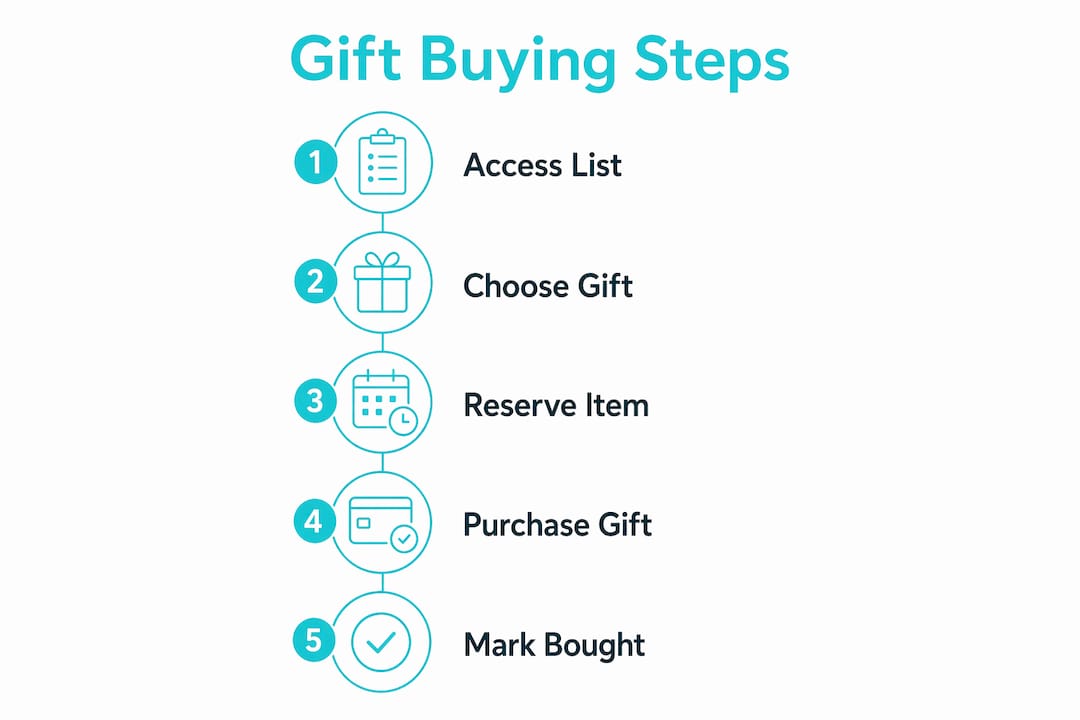
How to buy gifts from a shared list, step by step
The process is straightforward once you know what to look for. Follow these steps to get it right every time.
-
Get the list link. The recipient or list organiser shares a URL. Open it in any browser. No account is required on most platforms just to view the list.
-
Browse the items. Scroll through the list and look at each item’s title, image, and current price. Shared gift lists let recipients specify exact preferences, including size, colour, and variant, so you can see precisely what they want.
-
Check availability. Gift list platforms update pricing and availability automatically, so the information you see reflects the current status. If an item shows as unavailable, skip it and pick something else.
-
Reserve the item. If the platform supports reservations, mark the item as reserved before you buy. This tells other buyers it’s taken without revealing who bought it or spoiling the surprise.
-
Click through to the retailer. Most lists link directly to the product page on the original store. Click the link and add the exact item to your cart. Buying directly from the list link means you get the right variant automatically, which eliminates size and colour errors.
-
Complete your purchase. Check out on the retailer’s site as normal. Confirm the delivery address. If you’re sending the gift directly to the recipient, double-check the address before paying.
-
Mark the item as purchased. Return to the gift list and mark the item as bought. On platforms like WantThis, this updates the list in real time so no one else buys the same thing. Amazon, for example, automatically moves purchased items to a “Purchased” section and lets the recipient hide spoilers if they want to be surprised.
-
Coordinate with other buyers if needed. For group gifts, use the platform’s group-gift features, or a group chat, to agree who is contributing what.
Pro Tip: If you buy a gift from a different retailer than the one linked in the list, use the “Bought elsewhere” flag if the platform offers it. This keeps the list accurate for everyone else.
How to avoid common mistakes when purchasing from shared gift lists
Even with a clear list in front of you, buyers make avoidable errors. Knowing the pitfalls in advance saves time and prevents awkward duplicate presents.
- Don’t skip the reservation step. Buying without reserving first means another buyer could purchase the same item simultaneously. Always reserve before you check out.
- Watch for outdated product details. Not all platforms refresh prices and availability in real time. If a price looks too low or the item seems unusual, click through to the retailer to confirm the current status before buying.
- Verify the exact variant. Clicking the list link usually takes you to the correct size or colour. But if the retailer’s page defaults to a different option, check the product details carefully before adding to your cart.
- Confirm the delivery address. If you’re shipping directly to the recipient, make sure you enter their address at checkout, not your own. This is the most common logistical error in gift buying.
- Check whether the item has already been purchased. Coordination features in gift apps let buyers see purchase statuses in real time. Always refresh the list before buying, especially if you received the link days ago.
- Don’t edit the list. If you have edit access to the list, be careful not to accidentally delete or change items. Stick to the reservation and purchase marking features only.
Pro Tip: For last-minute gift buying, filter the list by price range if the platform allows it. This helps you find something available and within budget without scrolling through every item.
What are the best shared list platforms for UK buyers?
The right platform depends on how the recipient set up their list and what features matter most to you as a buyer. Universal gift list apps accept items from any online store, which is the most flexible option for UK shoppers who spread their wish lists across retailers like Amazon, John Lewis, ASOS, and Argos.
Key features to look for in a gift list platform:
- Universal item support. The best platforms let recipients add items from any retailer using a link or browser extension, so the list isn’t locked to one store.
- Price tracking. Platforms that monitor price changes notify buyers when an item drops in cost, which is useful for deciding whether to buy now or wait.
- No-account viewing. Instant browser access via a shared link means buyers don’t need to register just to see the list.
- Real-time purchase marking. When one buyer marks an item as purchased, the list updates immediately for everyone else.
- Occasion organisation. Lists organised by event, such as a Christmas gift list or birthday wishlist, help buyers find relevant items faster.
| Feature | Why it matters for buyers |
|---|---|
| Universal retailer support | Shop from any UK store, not just one platform |
| Price tracking | Know if an item is worth buying now or later |
| Real-time purchase marking | Prevents duplicate gifts instantly |
| No-account viewing | Reduces friction for casual buyers |
| Occasion-based organisation | Makes finding the right gift faster |
WantThis covers all of these features and is built specifically for UK shoppers. You can browse wishlist app comparisons to see how different platforms stack up on these criteria.
Key Takeaways
Buying gifts from a shared list removes guesswork, prevents duplicates, and gives recipients exactly what they asked for, making it the most efficient approach to gift giving for any UK occasion.
| Point | Details |
|---|---|
| Access requires only a link | Most platforms let buyers view a shared list without an account or app download. |
| Reserve before you buy | Marking an item as reserved prevents another buyer from purchasing the same gift simultaneously. |
| Click through from the list | Following the list link directly to the retailer selects the correct product variant automatically. |
| Mark as purchased after buying | Real-time purchase marking keeps the list accurate for all other buyers. |
| Price tracking helps timing | Platforms that monitor prices let buyers decide whether to purchase now or wait for a better deal. |
How shared lists change gift giving
Shared lists solve a problem that quietly costs people money and stress. Without one, you call around to find out what someone wants, guess at sizes, and can still end up with a duplicate. The coordination overhead is exhausting, especially for group events like baby showers where six people might be shopping independently.
The “mark as purchased” feature changes group dynamics more than you might expect. People stop texting each other to check who is buying what, because the list handles it. That one feature alone is worth the five minutes it takes to set up a shared list before any celebration.
Price tracking is becoming a standard feature rather than a premium one. Being able to see that a £60 item dropped to £45 last week is genuinely useful. It’s the kind of information that used to require checking a retailer manually every few days. Now it’s automatic.
If you’re organising a gift for a group, send the list link at least two weeks before the event. Last-minute buyers tend to skip the reservation step because they’re in a hurry, and that’s when duplicates happen. A little lead time fixes most coordination problems before they start. You can find gift ideas by occasion to help the recipient build a list worth sharing.
WantThis makes coordinating gift purchases simple
WantThis is a free UK gift list platform built for exactly this kind of coordinated gift buying. You paste a product link from any online retailer, and WantThis pulls in the title, image, and current price automatically. Friends and family receive a single link to view the list, privately reserve items, and mark gifts as purchased so surprises stay intact.

WantThis also tracks price drops on saved items and works in any browser, on desktop or mobile. For group events, the Secret Santa organiser runs an automatic draw so everyone gets a name without any awkward coordination. Whether you’re shopping for a birthday, Christmas, or a baby shower, WantThis gives every buyer a clear, up-to-date list and the tools to buy with confidence.
FAQ
What is a shared gift list?
A shared gift list is a curated collection of items a recipient has chosen from one or more online stores, shared via a link so friends and family can view, reserve, and purchase gifts without duplicating them.
Do I need an account to buy gifts from a shared list?
Most platforms let you view a shared list without registering. Creating an account is recommended if you want to reserve items or mark them as purchased in real time.
How do I avoid buying a duplicate gift?
Reserve the item on the platform before purchasing, then mark it as bought after checkout. Platforms with real-time purchase marking update the list instantly so other buyers see it’s taken.
Can I buy from a different store than the one listed?
Yes. If the platform supports a “Bought elsewhere” flag, use it to mark the item as purchased even if you bought it from a different retailer. This keeps the list accurate for everyone else.
What happens if an item on the list is out of stock?
Gift list platforms that refresh availability automatically will show the item as unavailable. Choose a different item from the list or contact the recipient to ask if they have an alternative preference.