
How Wishlists Sync Across Devices: A UK Guide

Wishlist syncing across devices is defined as the automatic process of storing your saved items in a cloud-based account so they appear instantly on every device you log into. When you add a gift idea on your phone, it shows up on your laptop within seconds. No manual transfers, no duplicate lists. This guide explains how that process works, why guest wishlists often fail to sync, and how UK consumers planning birthdays, Christmas, or weddings can avoid losing their carefully curated lists. Understanding how wishlists sync across devices is the first step to making gift planning genuinely stress-free.
How do universal wishlist apps sync your wishlists across devices?
Universal wishlist apps store your data on remote servers, not on your phone or laptop. Logging in with the same email associates your wishlist with your account and triggers automatic syncing across mobile, tablet, and desktop. Any change you make on one device pushes to the server, and every other logged-in device pulls that update almost immediately.
This approach is called cloud-based account syncing, and it is the standard method used by modern wishlist platforms. The practical benefit is significant: you can browse gifts on your phone during your lunch break, then pick up exactly where you left off on your laptop at home. Your list stays consistent regardless of which device you reach for.

Platform-agnostic syncing is what separates universal wishlist apps from store-specific tools. A universal app works across iOS, Android, and Windows browsers simultaneously. That matters for UK households where one person uses an iPhone, another uses an Android phone, and both share a Windows laptop for evening browsing.
Here is what good cross-device wishlist management looks like in practice:
- Cloud account storage: Every item you save is written to a server, not to your device’s local memory.
- Instant reflection: Changes appear on all logged-in devices without refreshing or re-downloading the app.
- Mixed-device support: iOS, Android, and desktop browsers all access the same central data.
- Shared access: Friends and family can view your list from their own devices using a shared link.
- No manual export: You never need to email yourself a list or screenshot items to transfer them.
Wishlist apps with cloud sync eliminate manual data transfers and keep item details like titles, images, and prices consistent across every device you use.
Pro Tip: Always check that a wishlist works in a web browser as well as on your phone. If it only works in one place, your syncing will break the moment you switch devices.
Why do store-specific wishlists often fail to sync?
Store-specific wishlists behave very differently from universal apps. When you save items as a guest on a retailer’s website, that data is typically stored in your browser’s local cookies. Cookies live on one device, in one browser. They do not travel with you.
Guest wishlist data stored in browser cookies is lost the moment you clear your cache or switch to a different device. This is not a bug. It is how cookie-based storage is designed to work. For casual browsing it is fine, but for gift planning across weeks or months, it is a serious problem.
The risks for UK consumers planning gifts are real and specific:
- Cache clearing: Routine browser maintenance wipes your entire guest wishlist without warning.
- Device switching: Moving from your work laptop to your home desktop means starting from scratch.
- Browser switching: A guest list saved in Chrome does not appear in Safari or Firefox.
- Link sharing: Guest wishlists generally cannot be shared, so coordinating gifts with family is impossible.
- Expiry: Some retailers automatically expire cookie-based lists after a set number of days.
Only logged-in accounts enable syncing on store-specific platforms. Creating a free account with a retailer takes two minutes and permanently links your wishlist to your email address. That one step moves your data from a temporary cookie to a server, making it accessible from any device you sign into.
The lesson for gift planners is straightforward. If you are building a Christmas list or a wedding registry on a retailer’s site, always create an account first. Saving as a guest is a shortcut that costs you your list.
What is the difference between iCloud syncing and app-specific cloud syncing?
Two distinct syncing systems exist for wishlist apps, and they behave very differently depending on which devices you own.
iCloud syncing: Apple devices only
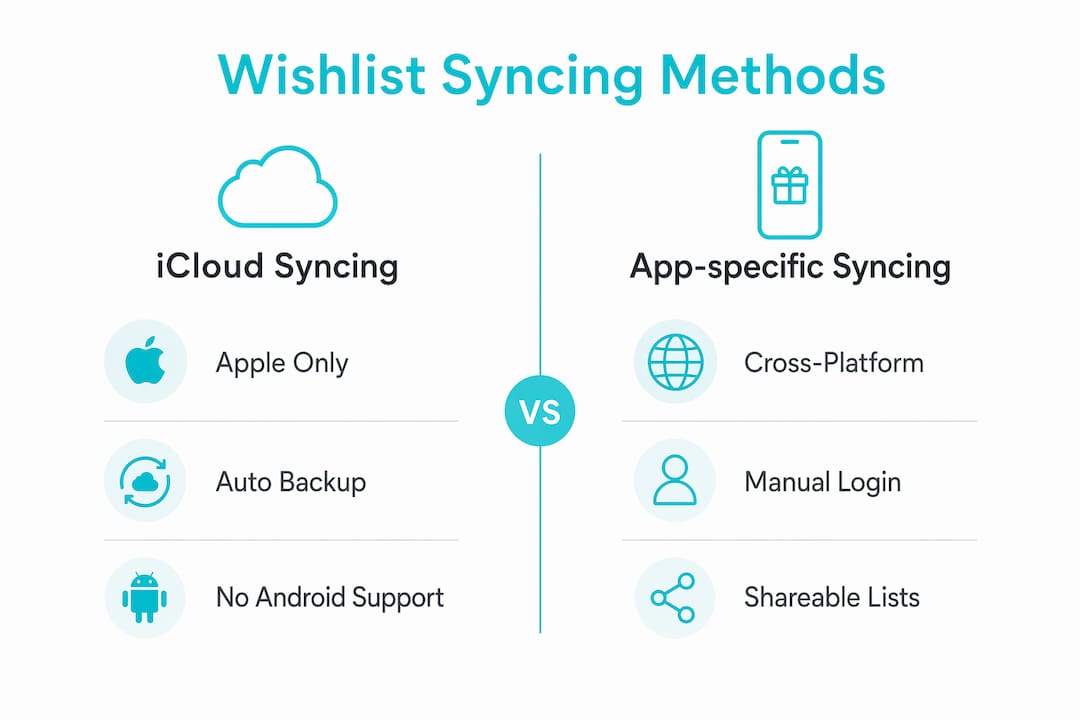
iCloud syncing is built into Apple’s operating system and works automatically for apps that support it. If you save a wishlist on your iPhone, it appears on your iPad and MacBook without any extra setup. iCloud syncing supports only Apple devices, so the moment you try to access that list on an Android phone or a Windows PC, you hit a wall.
This is a meaningful limitation for UK households. Many people own a mix of Apple and non-Apple devices. A wishlist locked inside iCloud is invisible to anyone outside the Apple ecosystem, including family members who want to check what gifts you actually want.
App-specific cloud syncing: works everywhere
App-specific cloud syncing uses the app developer’s own servers rather than Apple’s or Google’s infrastructure. Cross-platform cloud sync supports iPhone, Android, Windows, and web browsers from a single account. You log in with your email on any device and your list is there.
| Syncing method | Devices supported | Requires same OS? | Shareable with others? |
|---|---|---|---|
| iCloud (ecosystem sync) | Apple only (iPhone, iPad, Mac) | Yes | Limited |
| App-specific cloud sync | iOS, Android, Windows, web | No | Yes, via shared link |
The table makes the choice clear for most UK consumers. If everyone in your household uses Apple devices, iCloud syncing works well. If your family uses a mix of devices, app-specific cloud syncing is the only method that keeps everyone on the same page.
Pro Tip: Before committing to a wishlist app, test it by logging in on two different device types. If your list appears on both within 30 seconds, the app uses proper cloud syncing. If it does not, look elsewhere.
Practical tips for smooth wishlist syncing on any device
Getting wishlist syncing right comes down to a few consistent habits. Most syncing failures are not technical problems. They are the result of small oversights that are easy to fix once you know what to look for.
-
Use the same email address on every device. Your account email is the key that links all your devices to the same wishlist data. Using different emails on different devices creates separate, disconnected lists.
-
Choose an app with universal cloud syncing. Universal apps with cloud sync support all major platforms and remove the need to manage data manually. Check that it works on your phone, your tablet and a standard web browser before you commit.
-
Always log in before saving items. Saving items as a guest, even briefly, stores data locally. Log in first and every item goes straight to your cloud account.
-
Check your list on a second device after adding items. A quick verification confirms your syncing is working correctly. If an item you added on your phone does not appear on your laptop within a minute, check that you are logged in on both devices.
-
Use sharing features to coordinate gifts with family. Sharing wishlists via unique links lets friends and family see your list, reserve items privately, and avoid buying duplicates. This is the feature that turns a personal list into a proper gift-planning tool.
-
Install the browser extension if one is available. A browser extension lets you add items from any retailer’s website in one click, and those items sync to your account immediately. This is especially useful when you spot something you want while browsing outside the app.
Cross-device wishlist management works best when you treat your account login as the foundation of the whole system. Everything else, the syncing, the sharing, the price tracking, depends on that single consistent login.
Key takeaways
Wishlist syncing works by linking your saved items to a cloud-based account, so every logged-in device reflects the same up-to-date list automatically.
| Point | Details |
|---|---|
| Cloud accounts power syncing | Logging in with the same email on every device keeps your wishlist consistent and current. |
| Guest wishlists do not sync | Cookie-based guest lists are device-specific and lost when you clear your cache or switch browsers. |
| iCloud is Apple-only | Ecosystem syncing locks your list to one device family; app-specific cloud sync works across all platforms. |
| Universal apps are the safest choice | Apps that support iOS, Android, and web browsers give you full cross-device access without restrictions. |
| Sharing turns syncing into coordination | A shared wishlist link lets family members reserve gifts privately, preventing duplicates before they happen. |
Why syncing is the feature most gift planners overlook
Plenty of people build careful wishlists and then lose them because they saved everything as a guest. It happens every December: someone spends an hour on a Christmas list on their work laptop, clears the browser cache on a Friday afternoon, and the list is gone, because guest data lived in a cookie rather than an account.
Few people test their syncing before they need it. They assume it works, then discover it does not while standing in a shop trying to check what was already on the list. Testing on a second device takes 30 seconds and saves real frustration.
Cross-device syncing matters far more for social gift planning than most people realise. When you are coordinating a birthday present with three other people, or running a family Secret Santa, the list needs to be live and shared. A list that only exists on one device is not a shared list. It is a note.
Another common mistake is choosing a wishlist app based on how it looks rather than how it syncs. A beautiful interface means nothing if your list disappears when you switch from your phone to your laptop. Syncing reliability is the feature to test first, not the last thing to check.
WantThis makes cross-device gift planning simple
WantThis is built specifically for UK consumers who want their gift lists to work on every device they own. Add items from any online retailer by pasting a product link, and WantThis automatically pulls in the title, image, and current price. Your list lives in your WantThis account, so it is the same in the browser on your phone, tablet or laptop, and always current wherever you check it.

The wishlist sharing features let friends and family reserve or mark items as bought without spoiling the surprise. Price drop tracking tells you when a saved item gets cheaper, which is handy for deciding whether to buy now or wait. Whether you are planning a birthday, a wedding registry, or a Christmas list, WantThis keeps everyone organised and gift-ready.
FAQ
How do wishlists sync across devices?
Wishlists sync by storing your saved items in a cloud-based account linked to your email. Every device you log into with that account reflects the same list automatically.
Why did my wishlist disappear when I switched devices?
Guest wishlists are stored in browser cookies, not in a cloud account. Cookie-based wishlist data is lost when you clear your cache or access the site from a different device or browser.
Does iCloud sync wishlists to Android or Windows devices?
No. iCloud syncing is limited to Apple devices. For cross-platform access across iOS, Android, and Windows, you need an app that uses its own cloud servers rather than iCloud.
What is the best way to sync a wishlist across all my devices?
Choose a universal wishlist app that supports iOS, Android, and a web browser. Log in with the same email on every device, and your list will stay consistent across all of them.
Can I share a synced wishlist with family for gift planning?
Yes. Most cloud-based wishlist apps generate a shareable link that lets family members view your list from their own devices. Platforms like WantThis also let the people buying reserve items privately so surprises stay intact.