
How to notify your family when a wishlist is updated

TL;DR:
- Using a shared wishlist platform like WantThis improves family gift coordination with link sharing, update alerts, and hidden reservations. Sharing the list, asking family to follow it, and checking privacy settings keeps everyone informed without spoiling surprises. WantThis offers free, UK-focused features including follower alerts, price tracking, and a Secret Santa organiser, making gift-giving smooth and confidential.
The quickest way to notify family when a wishlist is updated is to use a shared wishlist platform with group sharing and push or email alerts, such as WantThis. Here is the three-step checklist to get it working today:
- Create a list on your chosen platform and name it by occasion (e.g. “Christmas 2026”).
- Share the list link with each family member by email, WhatsApp or QR code.
- Ask family members to follow the list and allow notifications on their device, so update alerts reach everyone reliably.
Two trust signals worth checking before you commit to any platform: look at independent reviews to gauge reliability, and read the service’s privacy policy to confirm exactly who can see reservations and purchases. WantThis publishes its privacy and sharing details clearly, so you know from the outset that reserved items stay hidden from the list owner.
Table of Contents
- What should you look for in an app that notifies family about wishlist updates?
- How to set up a family group and get notifications working for everyone
- How do you keep gift surprises intact while sharing a wishlist?
- Why WantThis is a practical UK-ready choice for family wishlist notifications
- Key takeaways
- WantThis: the UK wishlist tool that keeps everyone in the loop
What should you look for in an app that notifies family about wishlist updates?
Not every wishlist tool handles group notifications well. Before you pick one, run through these criteria:
- Real-time push notifications when items are added, updated, or reserved
- Email alerts as a fallback for family members who do not use the app daily
- Anonymous reservation so the purchaser’s identity stays hidden from the list owner
- Cross-platform access so the list works on any phone, tablet or computer
- Group privacy controls that let you decide who can view or edit each list
- Occasion-based organisation for birthdays, Christmas, weddings, and Secret Santa draws
- Price tracking with alerts, handy for deciding whether to buy now or wait for a drop
- Free core features, with optional premium upgrades rather than a paywall on basics
To verify these before signing up, check the platform’s feature page and independent reviews. Reviews often flag notification reliability issues that the marketing copy glosses over. The privacy policy is the definitive place to confirm reservation visibility.
Pro Tip: For mixed-age families, prioritise clear in-app reservation with a hidden purchaser identity above all else. Push notifications are easy to set up, but if Grandma can accidentally see who bought what, the surprise is gone before the wrapping paper comes out.

Price alerts are a secondary benefit worth having, especially for higher-value items on a Christmas or wedding list, but they should not be the deciding factor when the primary goal is coordinating family notifications.
How to set up a family group and get notifications working for everyone
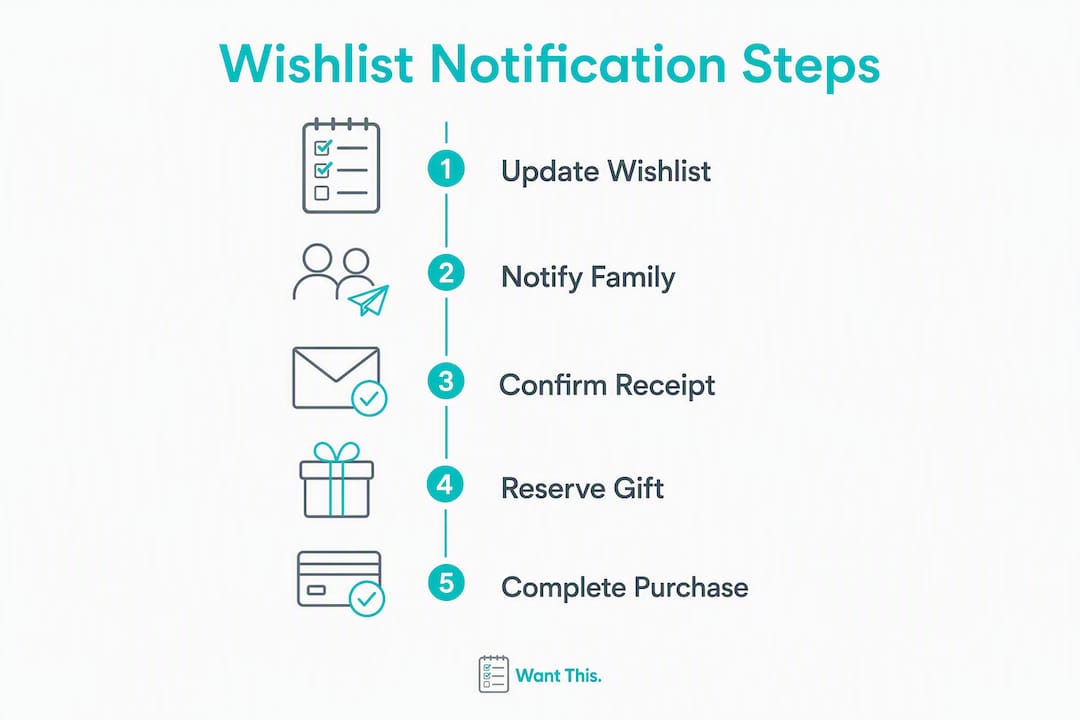
Follow these steps on WantThis or any comparable platform. The process is device-agnostic.
Setting up the group and invitations
- Create your free account at wantthis.co.uk.
- Create a new list and assign it to an occasion (Christmas, birthday, baby shower).
- Open the sharing settings and copy your list’s share link or QR code.
- Send the link to family members by email or WhatsApp. They can view the list and reserve gifts without creating an account.
- Ask family members who want update alerts to sign in and follow the list before assuming notifications are live.
Adding items and reserving gifts
- Add items by pasting a product URL from any UK retailer. WantThis automatically pulls in the title, image, and current price using its image pull feature.
- Instruct gift buyers to use the “reserve” or “mark as bought” function when they claim an item. This hides the purchase status from the list owner while showing other gift buyers that the item is taken, preventing duplicate gifts.
Enabling notifications
- In your account’s notification settings, make sure email and push alerts are switched on.
- On each device, go to OS settings (iOS: Settings > Notifications; Android: Settings > Apps) and confirm the browser or app has permission to send notifications. This step is the most commonly missed.
Troubleshooting checklist
- Notifications not arriving? Check OS-level permissions first, then confirm the family member is following the list and is signed in on the correct account.
- Emails going to spam? Ask family members to add the platform’s sender address to their contacts.
- Duplicate accounts? A family member who signed up twice with different email addresses may be following the list on the other account. Confirm which account they used.
- Items not syncing? Refreshing the page or reopening the app usually resolves a stale cache.
Resolving the OS permission block and the duplicate-account issue covers the vast majority of notification failures families encounter.

How do you keep gift surprises intact while sharing a wishlist?
Sharing a list with the whole family is only useful if the privacy settings are set up correctly. A few checks and etiquette rules go a long way.
Privacy checks to run before you share
- Confirm reserved items are hidden from the list owner. On WantThis, when a family member reserves an item, the list creator cannot see who reserved it or that it has been claimed.
- Check whether the list owner can see “reserved” status at all. Some platforms show a greyed-out item to the owner; others hide it entirely. Know which behaviour your platform uses.
- Review address visibility. If the platform supports direct delivery, confirm that the recipient’s address is not visible to all group members.
- Understand anonymity options. Some platforms let buyers reserve anonymously even within the group; others show the reserver’s name to fellow group members but not the list owner. Amazon’s shared list feature, for example, notifies collaborators with the invitee’s name when they take an action, which is worth knowing if you use it alongside a dedicated wishlist tool.
Etiquette pointers
- Label items with notes such as “keep this a surprise” or “happy for anyone to buy” so buyers know your preference without needing to ask.
- Brief older family members on how reservation works before the occasion. A quick phone call explaining “if you see something greyed out, it’s already being bought” prevents confusion.
- For “no gifts” requests, add a note to the list description rather than leaving the list empty, which can look like a technical error.
Pro Tip: If your platform has a “mark as bought” option, use it when you purchase something elsewhere. It keeps the list accurate for everyone else and stops a second person buying the same item from a different shop.
For more on collaborative list etiquette in a UK context, WantThis covers common scenarios in its 2026 guide.
Why WantThis is a practical UK-ready choice for family wishlist notifications
WantThis was built specifically for UK gift coordination, and its feature set maps directly onto the selection criteria above.
Feature highlights
- Sharing by link, QR code, WhatsApp or email, with no account needed to view the list or reserve a gift
- Hidden reservations that keep purchases secret from the list owner while showing other gift buyers that an item is taken
- Follower alerts that tell family members by email, in-app and push notification when new items are added to a list they follow
- Price-drop alerts by email, in-app and push notification
- Secret Santa organiser with an automatic name draw, ideal for larger family groups
- Price tracking across hundreds of UK retailers with alerts and price history, useful for timing bigger purchases
- Web access on any phone, tablet or computer so every family member can take part regardless of their device
Quick-start checklist for WantThis
- Create a free account at wantthis.co.uk.
- Add a new list and select your occasion.
- Add items by pasting product links, scanning a barcode or entering them manually.
- Switch on push notifications and confirm your device allows them.
- Share the list link with family via the sharing feature.
- Ask family members to follow the list so they get alerts when you add new items.
The core features, including sharing, reservations, and notifications, are free. WantThis is available to UK shoppers now, with all features accessible in the web browser.
Pro Tip: Add items from a retailer like Lashra or any other UK store by pasting the product URL directly into WantThis. The platform pulls in the title, image, and price automatically, so your family sees exactly what you want without any ambiguity.
Key takeaways
Shared wishlists with group push and email alerts, combined with anonymous reservations, are the most reliable way to coordinate family gift giving without duplicates or spoiled surprises.
| Point | Details |
|---|---|
| Choose the right platform | Pick a tool with group sharing, push/email alerts, and hidden reservation built in as free features. |
| Share and follow | Share the list link and ask family members to follow it before anyone starts shopping. |
| Use hidden reservations | Anonymous or hidden reservation prevents duplicate gifts while keeping the surprise intact for the list owner. |
| Check device permissions | OS-level notification settings are the most common reason alerts fail; confirm them on every family member’s device. |
| WantThis for UK families | WantThis offers free sharing, hidden reservations, follower alerts, and a Secret Santa organiser for UK gift coordination. |
Always check the service’s privacy policy to confirm exactly what notification data is shared and with whom.
Getting family gifting right without the last-minute chaos
When notifications actually work, the difference is immediate. Lists stay current, nobody buys the same thing twice, and the Secret Santa draw runs itself. The organiser’s job shrinks from fielding a dozen “what does she want?” messages to simply sharing a link.
WantThis: the UK wishlist tool that keeps everyone in the loop
If you have been coordinating family gifts through group chats and spreadsheets, WantThis offers a cleaner route. It is a free UK wishlist platform where you create occasion-based lists, share them with family, and let hidden reservations do the work of preventing duplicates. Adding an item from any UK retailer takes seconds by pasting a link, family members who follow your list hear when you add something new, and price tracking alerts you when something on the list drops in price.

WantThis uses affiliate links when family members click through to a retailer and make a purchase; this is disclosed on the site and does not affect the price paid. Core features, including sharing, follower alerts, and the Secret Santa organiser, are free to use.
Ready to get started? Create your free wishlist and share it with your family today, or go straight to the sharing feature page to see how sharing works.
Useful sources and WantThis links
- WantThis sharing and group features — the best starting point for setting up a family group and understanding how sharing and notifications work.
- WantThis features overview — covers price tracking, sharing, and all core capabilities in one place.
- How to buy gifts from a shared list in the UK — practical guidance for gift buyers using a shared list, including reservation and purchase steps.
- WantThis privacy and terms — review the privacy policy linked in the site footer to confirm reservation visibility and data-sharing behaviour before inviting family members.