
How Image Pull Works in Wishlists: A Clear Guide

When you paste a product link into a wishlist, the platform immediately fetches the product’s image, title, and price from the retailer’s page. That automatic retrieval is called image pulling, and it’s what makes wishlists feel instant and visual rather than a plain list of URLs. The process involves requesting an image URL from an external source, storing a local copy to speed up future loads, and refreshing that copy when the product changes. Platforms like Steam and WishList.com handle this at scale, while consumer gift list tools like WantThis apply the same logic to everyday shopping.
- Fetching the image URL: The platform sends an HTTP request to the retailer’s page or API, parses the response, and extracts the product image URL.
- Caching: A local copy of the image is stored on the platform’s servers so repeat views load instantly without hitting the retailer’s server every time.
- Update triggers: Price changes, availability updates, or scheduled intervals prompt the platform to re-fetch and compare the stored image against the current one.
- Fallback handling: If the image URL breaks or returns an error, the platform substitutes a placeholder icon or prompts the user to select a replacement.
- Notification integration: Image and product data refreshes are often tied to alert systems, so when a price drops or a product launches, the notification carries the current image alongside the updated details.
Pro Tip: Set your wishlist platform to refresh images on event triggers (price changes, restocks) rather than on a fixed daily schedule. Event-driven refreshes keep visuals current without hammering external servers unnecessarily.
The term “image pull” also appears in software engineering, specifically in Docker and Kubernetes, where it describes downloading a container image from a remote registry. The consumer wishlist version borrows the same core logic: fetch from a remote source, cache locally, and decide when to pull again.

How Steam handles image pulling and wishlist notifications
Steam’s wishlist system is one of the most studied examples of image and data synchronisation at scale. When a user adds a game to their Steam wishlist, the platform pulls the game’s header image, capsule art, and metadata from Valve’s content delivery network, then caches those assets regionally so users across different countries see fast load times regardless of where the game’s primary assets are hosted.
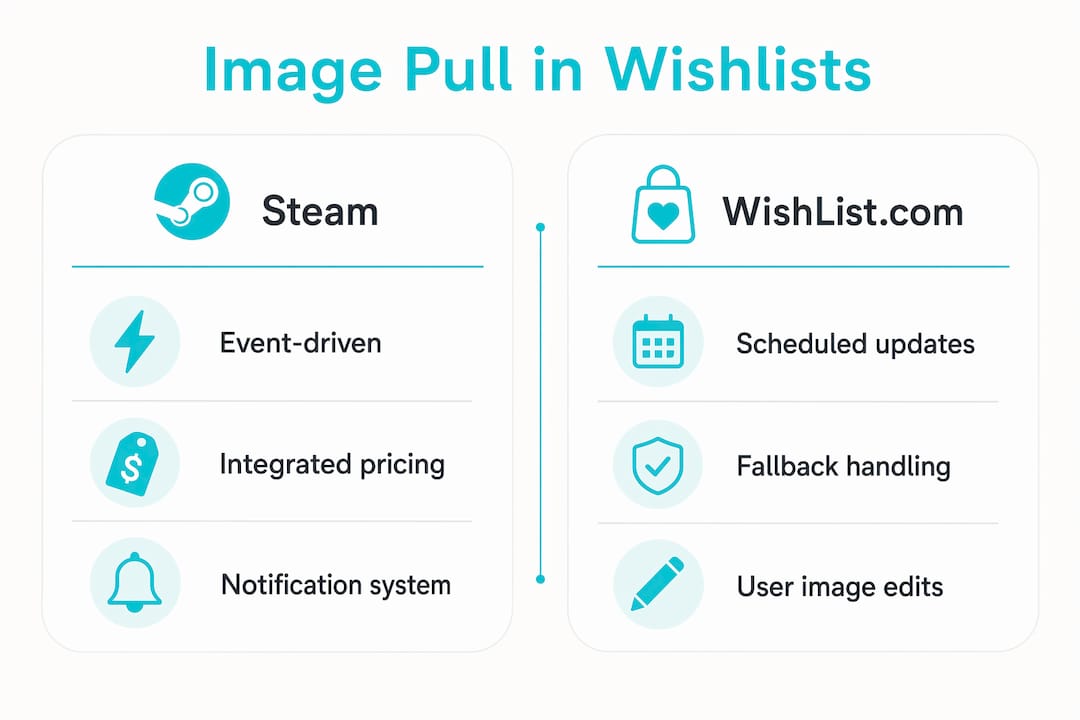
The notification side of Steam’s wishlist is where the system gets particularly interesting. Steam sends notifications to approximately 60% of wishlist users when a game launches or goes on sale, with built-in cooldown periods that prevent the same user from receiving repeated alerts for the same item within a short window. That cooldown design protects the user experience while still delivering timely alerts.
| Feature | How Steam handles it |
|---|---|
| Image pull frequency | On item add, on store page update, and on sale/launch events |
| Notification trigger | Game release date or sale start, tied to wishlist item status |
| User notification rate | Approximately 60% of wishlist users per launch or sale event |
| Cooldown system | Prevents duplicate alerts within a defined period per item |
| Regional caching | Assets distributed via CDN for low-latency access globally |
| Pricing data sync | Price and discount data pulled alongside image on update events |
Several technical challenges sit behind that table. Steam must handle regionalisation, meaning the same game may display different prices and sometimes different artwork depending on the user’s country. Cache invalidation is another layer: when a publisher updates a game’s cover art mid-sale, Steam needs to detect the change and push the new image to cached copies without breaking existing wishlist views. Scalability is the third challenge, since millions of users may check their wishlists simultaneously during a major sale event like the Steam Summer Sale.
- Regionalisation: Image and pricing data are localised per storefront region, so a wishlist item shows the correct currency and regional artwork.
- Cache invalidation: When product assets change, the platform detects the update and replaces stale cached images with fresh ones.
- Scalability: CDN distribution ensures image delivery stays fast even when traffic spikes during major sale events.
- User experience personalisation: Notification content includes the current image and price, making alerts feel relevant rather than generic.
The integration of pricing data with image pulls is what makes Steam’s wishlist notifications genuinely useful. A notification that shows the game’s cover art alongside a 60% discount is far more likely to drive a purchase than a plain text alert.
How WishList.com pulls images and manages wishlist functions
Consumer wishlist platforms like WishList.com take a slightly different approach to image retrieval than a closed ecosystem like Steam. Because users can add items from any retailer, the platform cannot rely on a single content delivery network. Instead, it uses a combination of web scraping, API requests, and user-provided image selections to populate wishlist items with visuals.
WishList.com’s image pulling works by parsing the product page HTML when a user submits a link, extracting Open Graph image tags or standard product image elements, and storing the result against that wishlist item. When a retailer exposes a product API, the platform can query it directly for a cleaner, more reliable image URL. Users also have the option to manually select or replace an image if the automatic pull returns the wrong visual or no image at all.
Wishlist management on platforms like this goes well beyond image retrieval:
- Adding and removing items: Users can add products from any URL, remove items they no longer want, and reorder their lists freely.
- Naming and organising lists: Lists can be named by occasion (birthday, wedding, Christmas) and given custom background images to make sharing feel personal.
- Image selection: If the automatic pull grabs the wrong image, users can choose an alternative from the page or upload their own.
- Sharing and reservations: Lists can be shared with friends and family, who can privately mark items as reserved so gifts are not duplicated.
- Price drop notifications: The platform monitors saved items and alerts users when prices fall, often pairing the alert with the current product image.
Broken images are a practical reality on any platform that pulls from third-party retailers. When a retailer changes its URL structure or removes a product, the stored image URL returns a 404 error. Platforms handle this by detecting the failure during a routine refresh and substituting a default placeholder icon, then flagging the item so the user can update it manually. That fallback keeps the list visually intact even when a product goes out of stock or a retailer restructures its site.
Common user questions about image pulling on wishlist platforms:
Why did my wishlist item’s image disappear? The retailer likely changed the product URL or removed the item. The platform’s next refresh detected the broken link and replaced it with a placeholder. You can re-add the item or select a new image manually.
Can I add an item from any store? Most consumer wishlist platforms support any public product URL. Image pull success depends on whether the retailer’s page includes standard image metadata like Open Graph tags.
How often does the platform update my item’s image? Updates typically happen on a scheduled basis (often daily or weekly) or when a price or availability change triggers a refresh.
What if the wrong image was pulled? Most platforms let you replace the image manually from within the item editor.
Key user experience factors when platforms display wishlist images
Loading speed is the first thing users notice, and it’s directly tied to how well a platform manages its image cache. A wishlist that takes three seconds to render product images will lose users to frustration before they ever share a list. Platforms address this by storing resized, compressed versions of pulled images on their own servers rather than linking directly to the retailer’s full-resolution file. That approach cuts load times and insulates the wishlist from retailer server outages.
Fallback content for missing images protects user trust in a way that’s easy to underestimate. A wishlist full of broken image icons looks abandoned and unreliable. A clean placeholder that says “image unavailable” or shows a category icon keeps the list readable and signals that the platform is handling the problem rather than ignoring it.
Cross-device consistency is another factor that matters more than it might seem. A user who builds a wishlist on a desktop browser expects to see the same images when they open the app on their phone. That requires the platform to store images centrally and serve them from a single source rather than pulling fresh from the retailer on each device separately.
Pro Tip: When sharing a wishlist, check that all item images have loaded correctly before sending the link. A shared list with missing visuals makes it harder for friends and family to identify what you actually want.
Security is a real concern when pulling images from external sources. Some platforms proxy all external images through their own servers, which lets them scan for malicious content and strip tracking pixels before the image reaches the user’s browser. Others rely on HTTPS filtering and trusted-source allowlists to reduce risk. Either way, pulling images from arbitrary URLs without any validation creates exposure that responsible platforms take seriously.
What software engineering’s image pull concept tells us about wishlists
In software engineering, “image pull” has a specific meaning: downloading a container image from a remote registry so it can run on a local system. Kubernetes manages this through a field called imagePullPolicy, which controls exactly when the system fetches a new copy of an image versus using a locally cached version.
Three policies define the behaviour. Always tells the system to check the registry every time a container starts, ensuring the latest version is always used. IfNotPresent skips the download if a local copy already exists, prioritising speed over freshness. Never disables remote fetching entirely, relying on whatever is already stored locally. Docker’s pull command follows similar logic: by default it pulls the :latest tag, uses content-addressable storage so identical layers are never downloaded twice, and supports pinning to a specific version via a SHA256 digest for guaranteed reproducibility.
The parallel to consumer wishlists is direct:
- Always (equivalent): Platforms that re-fetch product images on every page load guarantee freshness but increase server load and latency.
- IfNotPresent (equivalent): Platforms that serve cached images unless a trigger event occurs balance performance with accuracy.
- Never (equivalent): Platforms that store a static copy of the image at the time of adding and never update it are fast but risk showing outdated visuals.
Credential verification adds another layer in the engineering world. Kubernetes’ AlwaysVerify policy checks image credentials before using a cached copy, ensuring that access permissions haven’t changed since the image was last pulled. Consumer wishlist platforms apply an analogous check when they validate that a product URL still resolves and that the image at that URL matches what was stored.
Security implications carry across both domains. In container environments, pulling from unverified registries risks introducing malicious code. In wishlist platforms, pulling images from arbitrary retailer URLs without validation risks serving manipulated or harmful content to users. The mitigation strategies are similar: use trusted sources, validate content before serving it, and proxy external assets through a controlled layer.
WantThis puts the consumer side of this into practice. When you paste a product link, the title, image, and current price are pulled automatically from the retailer’s page, and the price tracking feature keeps an eye on the item so you get an alert when the price drops.
Try WantThis for automatic image and price pulling on your wishlists

WantThis makes wishlist image pulling effortless. Paste any product link from any UK retailer or Amazon, and WantThis instantly pulls the title, image, and live price into your list. Organise by occasion, track price drops, and share your list with friends and family who can reserve items privately so surprises stay intact.
Start your free wishlist on WantThis and see how automatic image pulling makes gift planning genuinely easy.
Key Takeaways
Wishlist image pulling works best when platforms combine event-driven cache refreshes with reliable fallback handling and security-conscious image proxying.
| Point | Details |
|---|---|
| Image pull basics | Platforms fetch product images from external URLs, cache them locally, and refresh on price or availability triggers. |
| Steam notification reach | Steam notifies approximately 60% of wishlist users when a wishlisted game launches or goes on sale. |
| Fallback handling | Broken image URLs are replaced with placeholder icons automatically, keeping lists visually intact. |
| Engineering parallel | Kubernetes imagePullPolicy mirrors wishlist cache logic: Always, IfNotPresent, and Never map to freshness vs. performance trade-offs. |
| Security practice | Responsible platforms proxy external images through their own servers to validate content before it reaches users. |