
Stop Duplicate Gifts in Six Steps With a UK Family Gift List

A family gift list is a shared wishlist where relatives add what they’d actually like, then givers reserve or claim items so nobody buys the same thing twice. The fastest fix for duplicate presents and spoiled surprises is simple: create one shared list today, add a few items, and send the link to everyone buying gifts. Platforms like WantThis let you do this without asking anyone to create an account.
TL;DR:
- Shared gift lists prevent duplicate presents by updating in real time when items are reserved or purchased, especially useful for large family events.
- Look for platforms that support universal links, private reservations, automatic item details, and no-account access for givers to maximize accessibility and efficiency.
- Using separate lists for individuals and shared household items simplifies organization and reduces confusion during busy occasions like Christmas or weddings.
- If a reserved gift becomes unavailable or plans change, quickly releasing the reservation ensures others can select the item, maintaining list accuracy.
- Incorporating experience gifts or contributions toward larger projects in the list offers thoughtful alternatives to physical presents and helps avoid clutter.
Table of Contents
- Why a shared family gift list is worth setting up
- What to look for in a family wishlist app
- How to set up a family gift list in six steps
- Organising lists by person, occasion and household
- Keeping surprises intact and data safe
- How reservations and visibility controls stop duplicate gifts
- What happens when a reserved gift falls through
- Adding thoughtful ideas beyond physical presents
- Why purpose-built tools beat spreadsheets and group chats
- WantThis matches the checklist, and it’s free to start
- Sources
- FAQ
Why a shared family gift list is worth setting up
Anyone who has bought two identical building sets for the same nephew knows the problem isn’t a lack of love, it’s a lack of visibility. A shared list fixes that by letting the person buying the gift see, in real time, what’s already spoken for.
The benefits stack up quickly once a family actually uses one:
- No more duplicate gifts. When a giver reserves or marks an item as bought, it disappears from view for everyone else, so two aunts don’t turn up with the same jumper.
- Fewer repeated questions. Instead of five separate “what does Sam want for his birthday?” messages scattered across three group chats, everyone checks one link.
- Lower barrier for less tech-savvy relatives. WantThis lets givers view and reserve items from a shared link without signing up for anything, which matters more than you’d think when grandparents are involved.
- Faster planning for big occasions. Christmas, weddings and baby showers all involve multiple buyers working from the same short window of time, and one list keeps that coordination in one place instead of ten.
Families who switch from group chats to a proper list tend to notice the change immediately, mostly because the arguments about “who’s getting what” simply stop happening.
What to look for in a family wishlist app
Not every wishlist tool handles family gifting well. Some are built for one-off events, others assume everyone will register for an account, and a surprising number only work with a handful of retailers. Before you commit to one, check it covers the basics.
- Reserve or claim functionality, so an item is marked as taken (or privately marked as bought) the moment someone commits to it.
- Universal link support, meaning you can paste a link from any online retailer, not just a shortlist of big names.
- No-account access for givers, so a shared link works whether the recipient is tech-confident or barely uses email.
- Automatic price, image and title pulling, plus ideally some form of price tracking so you know if something’s dropped before you buy.
- A Secret Santa organiser with an automatic draw and private reveal links, useful for larger extended families running one exchange instead of ten individual gifts.
- A browser extension and mobile app, so you can add something to the list the moment you spot it, rather than trying to remember it later.
Pro Tip: Test the link-sharing feature with one relative before rolling a list out to the whole family. If they can view and reserve an item within thirty seconds without creating an account, the tool will work for your least tech-confident relatives too.
How to set up a family gift list in six steps
You can get a working list live fairly quickly. The order matters more than the tool you pick, so follow the sequence rather than jumping straight to adding items.
- Decide on structure first. For a small household, one shared list often works. For an extended family with several birthdays and one big Christmas event, separate lists per person (plus one shared “family house” list) stay easier to navigate.
- Collect items quickly. Use a browser extension or the mobile app to save things while you’re actually shopping, rather than trying to reconstruct a wish list from memory later. Pasting a product link into most platforms will auto-fill the title, image and price for you.
- Label everything clearly. Add the recipient’s name, and where relevant, size, colour and a rough budget. Vague entries like “trainers” generate far more follow-up questions than “black Nike Air Max, size 8, up to £80”.
- Share the link and explain the etiquette. Send the list to every giver and be explicit: reserving an item hides it from others, and the recipient won’t see who bought what.
- Set a soft deadline. Agree a date by which everyone should have reserved something, especially for Christmas, so the last-minute buyers aren’t left with an empty list two days before the 25th.
- Run a Secret Santa draw if needed. If the family is doing one exchange rather than individual gifts, use the platform’s organiser to draw names automatically and send out private reveal links, so nobody sees who has who.
Once the list exists, the hardest part is behind you. Everything after that is maintenance.
Organising lists by person, occasion and household
A single list works fine for smaller families or one-off events, but it gets cluttered fast once you’re juggling multiple birthdays, Christmas, and joint household items in the same place. Splitting things out early saves confusion later.
A workable pattern many families use: keep one “family house” list for shared items (a new kettle, garden furniture, board games everyone will use), and separate individual lists for personal birthdays and Christmas requests. Simple naming conventions make this easier to follow at a glance, for example “Christmas — family house” or “Sam, age 8 — shoes and books”.
- Small family, one event? A single shared list is fine, keep it simple.
- Extended family with multiple birthdays? Separate lists per person, tagged by name and occasion.
- Couple with a joint household? Merge wish lists into one, migrating shared-item requests (furniture, kitchenware, experiences) onto that joint list rather than splitting them across two personal ones.
- Big Christmas gathering? One “family house” list for shared gifts, individual lists for personal items, both shared from the same invite.
Keeping surprises intact and data safe
The whole point of a shared list collapses if the recipient can see who reserved what. Look for a platform that offers hidden or anonymous reservations, so the person the gift is for only sees that an item has been claimed, not by whom.
Share progress counts rather than names where you can, “3 of 5 items claimed” tells a recipient the list is working without giving anything away. If a list connects to a browser extension or an app-store purchase, it’s worth glancing at how that platform handles your data. Google’s privacy policy covers how browser extension permissions and data are treated, and Apple’s billing guidance explains what happens when a purchase flows through an app rather than a website.
How reservations and visibility controls stop duplicate gifts
Duplicate gifts almost always come down to one thing: two people didn’t know the other had already bought something. Reservation and claiming features solve this directly by removing an item from general view the moment someone commits to it.
The mechanics matter here. A good system lets a giver mark an item as “reserved” (visible to other givers, hidden from the recipient) or “bought” (fully removed from the shared view). Visibility controls then decide who sees what: other givers need to see claimed status to avoid duplicating it, but the recipient should see none of it, so the surprise survives.
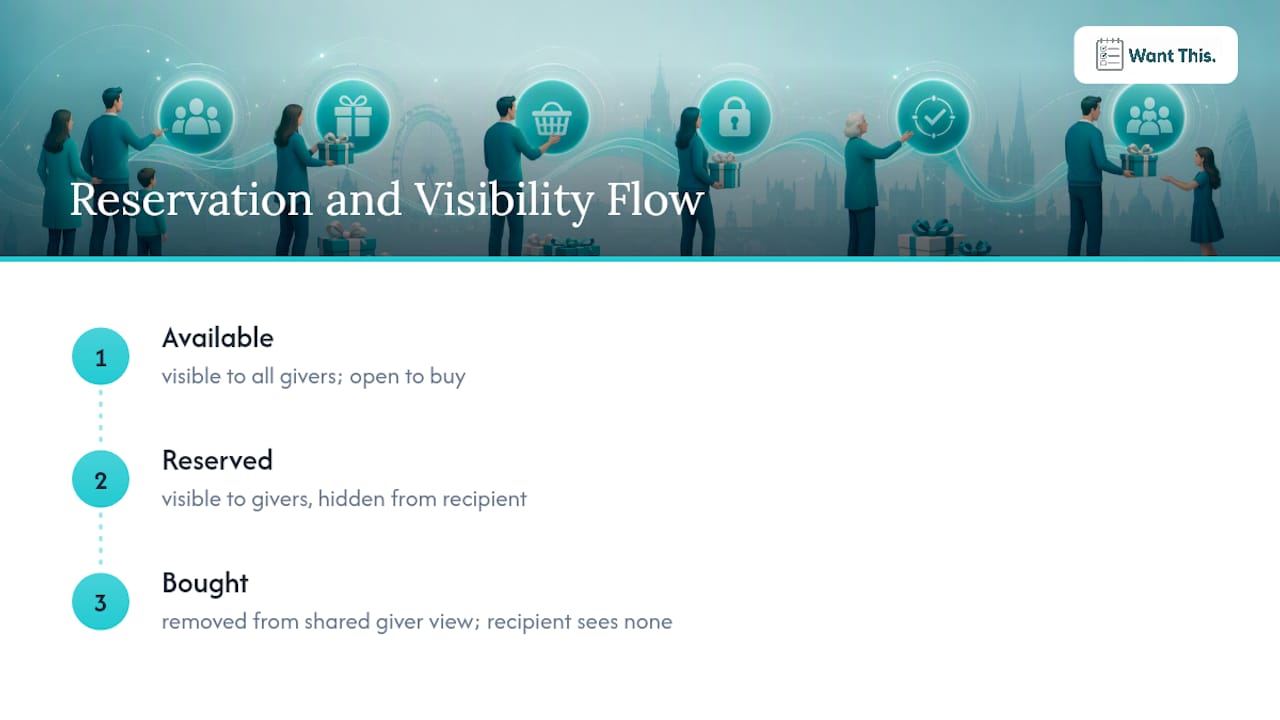
Where this breaks down is usually with lists that don’t support private reservations at all, forcing families back onto spreadsheets or group chats where claims get missed, overwritten, or simply never communicated. If three people are buying for the same event, all three need visibility into the same live list rather than three separate copies. A platform like WantThis handles this by letting relatives reserve items privately through a shared link, so the claim updates for everyone instantly without the recipient seeing a thing.
What happens when a reserved gift falls through
Plans change. A reserved item goes out of stock, someone’s budget shifts, or a relative simply changes their mind after committing. Handled badly, this is exactly how duplicate gifts creep back in, because nobody remembers to release the item back to the list.
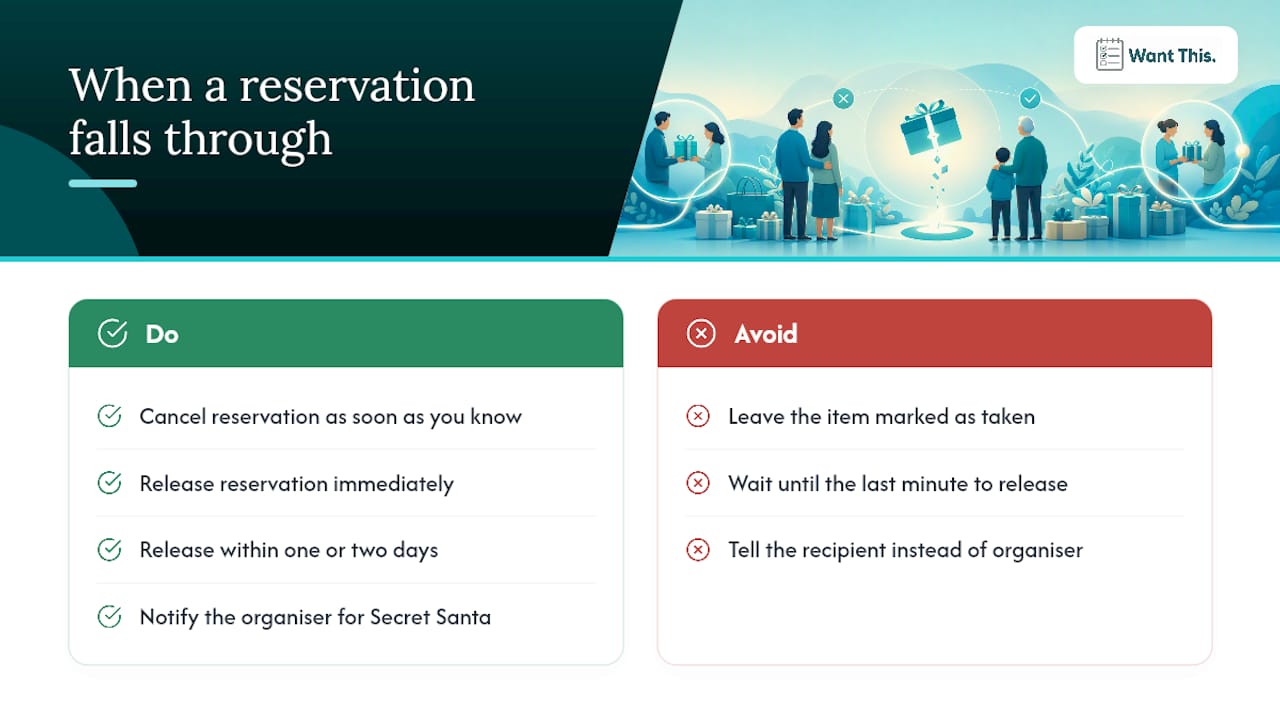
The fix is straightforward if the platform supports it: releasing a reservation should immediately make that item visible and claimable again for other givers, not leave it in limbo showing as taken when it isn’t. If you’re the one cancelling a reservation, do it as soon as you know rather than waiting, since a last-minute release gives other family members almost no time to pick up the slack.
It’s worth agreeing a simple family rule here: if you reserve something and later can’t follow through, release it within a day or two rather than leaving it sitting untouched until someone else asks. For Secret Santa specifically, a cancelled reservation matters more, since there’s usually only one buyer assigned per person, so a quick heads-up to the organiser (not the recipient) keeps the exchange on track.
Adding thoughtful ideas beyond physical presents
Not every entry on a family gift list needs to be a product link. Some of the most appreciated gifts are experiences or gestures that don’t fit neatly into a retailer catalogue, and a good list should have room for both.
Consider adding entries like a cinema trip, a cookery class, a subscription to something the recipient actually uses, or even a note asking for help with a specific task (an afternoon of babysitting, a lift to an appointment). These sit alongside material wishlist items just fine, they simply need a slightly different description since there’s no product page to pull an image from. For weddings and baby showers particularly, experience-based entries and contributions towards something larger (a honeymoon fund, nursery furniture) tend to get requested more than one-off physical items. If you’re stuck for inspiration on what to add, browsing curated gift ideas by occasion or looking at how other hosts structure varied quinceañera favour lists can spark ideas that go beyond the obvious.
Why purpose-built tools beat spreadsheets and group chats
Spreadsheets and chat threads work for about a week before someone loses track of who claimed what. A dedicated list keeps claims, images and sizing details in one place that updates for everyone automatically, rather than relying on someone manually crossing things off a shared document. For larger families, nominate one coordinator to set up the list and agree naming conventions early, it saves the whole family from reinventing the format every December.
Pro Tip: Roll a new list out to one enthusiastic relative first, then let them help onboard the rest. It spreads faster than one person explaining it to fifteen people at once.
— Stuart
WantThis matches the checklist, and it’s free to start
WantThis is built around the exact checklist covered above: paste a link from any online retailer and it pulls in the title, image and current price automatically, no manual entry required. Reservations stay private so recipients never see who’s claimed what, sharing works via a link with no account needed for givers, and the built-in Secret Santa organiser handles the draw and sends private reveal links for you.
The browser extension and mobile apps let you save items the moment you spot them while shopping, and price tracking flags drops on saved items so you know whether to buy now or wait. It’s free to use.
If you’re setting up a family list for the first time, start with the free WantThis account, add a handful of items, and share the link with two or three relatives to see how reservations work in practice. For weddings specifically, the wedding gift list tool works as a flexible alternative to a traditional registry.
Sources
For deeper how-to guidance on running a shared list, WantThis’s own gift list collaboration guide covers workflow examples in more detail. If a list connects to app-store purchases or browser extensions, Apple’s billing support and Google’s privacy policy are worth a quick read before you share personal data widely.
FAQ
What is a good gift for the entire family?
Shared experiences (a day out, a subscription box, a meal) or contributions towards something the whole household uses, like garden furniture or a games console, tend to work well as whole-family gifts. Adding these to a shared “family house” list keeps them separate from individual birthday requests.
What is the 7 gift rule?
Definitions vary depending on who you ask, but it’s generally used as a rough guide for limiting how many presents each child receives, rather than a fixed universal rule. Families who use it typically adapt the categories to their own budget and priorities rather than following a strict list.
What are some good gift lists to share with my family?
A shared wishlist platform where relatives add items and givers reserve them privately works better than a group chat or spreadsheet, since claims update automatically and nobody has to keep asking who bought what. Platforms like WantThis let you set this up in minutes with no account required for the people buying gifts.
What should I buy a family as a gift?
Check their shared list first if one exists, since it removes the guesswork entirely. If there isn’t one yet, experiences, subscriptions, or contributions towards a larger shared item are usually safer than guessing at individual preferences.
Do givers need to create an account to reserve a gift?
No, not on platforms built for this. Some platforms allow givers to view a shared list and reserve items directly from the link, with no sign-up required.