
How Retailers Link to Wishlists: A 2026 Guide

Wishlist linking is the practice of generating a unique, permanent URL tied to a customer’s saved product collection, making that list shareable across email, social media, and messaging apps. Understanding how retailers link to wishlists is the foundation of any serious customer retention strategy in e-commerce. Platforms like Shopify and Oracle Digital Commerce have made this a standard feature, not an optional add-on. Done well, wishlist links capture declared purchase intent, drive organic referrals, and feed CRM campaigns with high-quality behavioural data. This guide covers the technical setup, design principles, marketing applications, and legal requirements retailers need to get it right.
How retailers link to wishlists: the technical setup
Wishlist linking works by assigning each customer a unique permanent URL the moment they save their first product. That URL stays consistent, so it can be bookmarked, emailed, or posted to social media without breaking. The retailer does not need to rebuild the list each time someone visits the link.
Most retailers implement wishlist functionality through theme extensions or app embeds rather than custom code. On Shopify, for example, a wishlist app integrates directly into the storefront theme and handles URL generation automatically. Oracle Digital Commerce offers built-in wishlist configuration with multiple sharing channels including Facebook, Twitter, Pinterest, and email. These platforms handle the heavy lifting, so your development team focuses on placement and style rather than architecture.
The core setup decisions every retailer must make include:
- Button placement: A “Save to Wishlist” button on the product page, ideally near the “Add to Cart” button, captures the most intent. Placing it only in the account area misses the moment of interest.
- Guest wishlist support: Requiring login before saving kills engagement. Guest wishlist functionality captures intent from all visitors, not just registered users. That is a significant pool of potential customers to leave untapped.
- Sharing mechanisms: Offer at minimum a direct URL copy option, an email invite button, and social sharing icons. Each channel reaches a different segment of your customer’s network.
- Style customisation: The wishlist button and list page should match your store’s visual identity. A mismatched design signals to customers that the feature is an afterthought.
Pro Tip: Test your wishlist links on mobile, tablet, and desktop before launch. A URL that breaks on iOS or renders incorrectly on Android will cost you conversions and damage trust in the feature.
Why wishlist links drive engagement and sales conversion
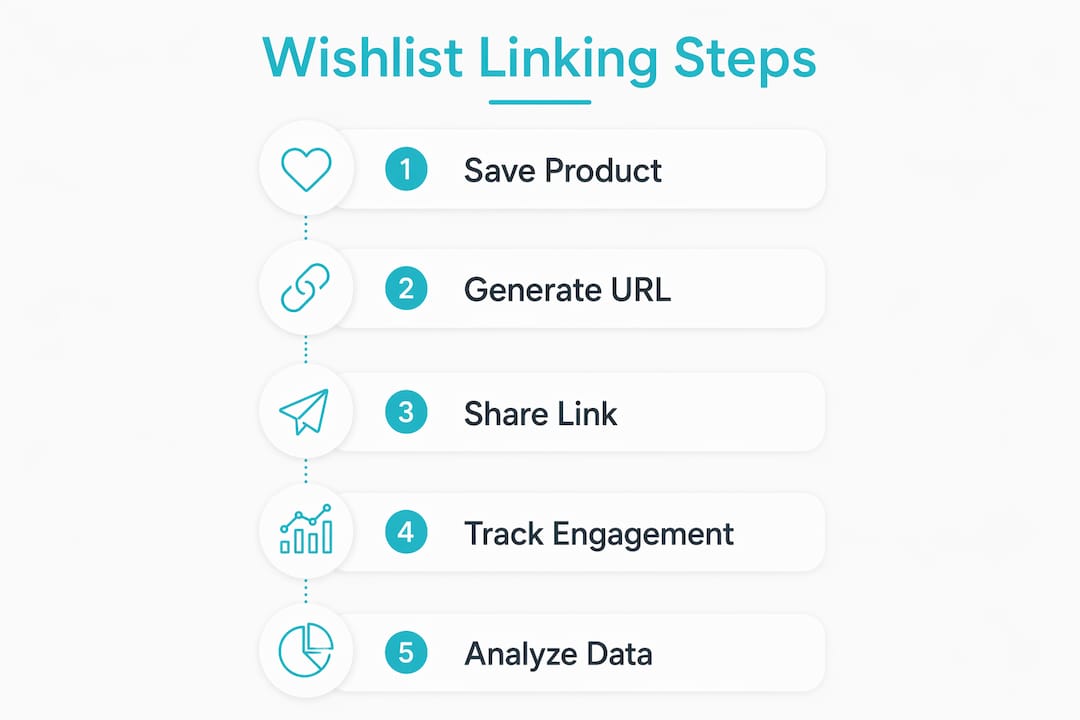
Wishlist data represents declared purchase intent, which is fundamentally different from cart abandonment data. A customer who adds something to a cart may have done so impulsively. A customer who saves a product to a wishlist has made a considered decision to track it. That distinction matters enormously for how you market to them.
The marketing applications of wishlist links fall into four clear categories:
- Price drop alerts: When a saved item goes on sale, an automated email with the product name, image, original price, and new price drives strong conversion. Price drop emails triggered by wishlist activity rank among the highest-converting wishlist communications when paired with urgency messaging.
- Restock notifications: If a saved item goes out of stock, a restock alert keeps the customer engaged rather than sending them to a competitor.
- Segmentation and targeting: Wishlist data lets you group customers by product category, price range, or brand preference. Those segments support far more relevant email campaigns than generic newsletters.
- Group gifting and referrals: Shared wishlist links sent to friends and family bring new visitors to your store through trusted personal recommendations, with zero acquisition cost.
Wishlists are additive to the shopping cart. They engage visitors who are interested but not yet ready to buy, reducing bounce rates and keeping your brand in consideration until the moment is right.
Pro Tip: Connect your wishlist platform to your CRM. Tag customers by the categories they save most. Then use those tags to personalise your next email campaign rather than sending the same message to your entire list.
The role of product thumbnails in wishlist link effectiveness
A wishlist link is only as useful as the experience it delivers when someone opens it. Effective wishlist design uses clear product thumbnails and concise feature callouts to improve recognition and increase the likelihood of a future purchase. If a customer opens their wishlist and cannot immediately identify a saved item, the link has failed its purpose.

The concept here is what designers call the “visual bridge.” The thumbnail on the wishlist page must match the product image the customer remembers from the product page. Inconsistent images, low-resolution photos, or cropped shots that hide the product create confusion and reduce conversion. The visual bridge is the design element that connects memory to action.
Retailers should evaluate wishlist design against three metrics:
| Metric | What it measures | Why it matters |
|---|---|---|
| Click-through rate on wishlist links | How often shared links get opened | Indicates whether the sharing mechanism is working |
| Wishlist-to-cart conversion rate | How often saved items get purchased | Measures the commercial value of the wishlist feature |
| Time from save to purchase | Average days between saving and buying | Informs the timing of price drop and restock emails |
Common design mistakes that hurt wishlist performance include:
- Using manufacturer stock images that differ from the actual product sold
- Displaying thumbnails too small to recognise on mobile screens
- Omitting the product name below the image, forcing customers to rely on memory alone
- Showing outdated prices that no longer reflect current availability
Clear, accurate thumbnails are not a cosmetic detail. They are a direct driver of whether a wishlist link converts or gets ignored.
Legal and privacy considerations for shared wishlist links
Public wishlist sharing creates real legal exposure if retailers do not address it explicitly. When a customer shares a wishlist, certain data becomes visible to anyone with the link, including the customer’s display name and any comments they have added to saved items. Without clear disclosure, this can constitute a privacy violation under data protection regulations.
Retailers operating wishlist features should implement the following safeguards:
- Privacy setting options: Offer at least three levels: Private (visible only to the owner), Group (visible to invited members), and Shared (accessible via public link). Customers need control over who sees their list.
- Explicit Terms of Use language: Your terms must state clearly what information becomes visible when a list is shared publicly. Vague language is not sufficient and will not protect you in a dispute.
- In-feature disclosure: Display a short notice at the point of sharing, not buried in a terms document. Something as simple as “Your name and item comments will be visible to anyone with this link” satisfies the transparency requirement.
- Data minimisation: Avoid collecting or displaying more customer data on shared lists than the feature requires. Names and item notes are standard. Order history, account details, and purchase frequency are not.
Pro Tip: Have your legal team review the wishlist sharing flow annually. Privacy regulations change, and a feature that was compliant in 2024 may need updates by 2026.
Key takeaways
Retailers who implement wishlist linking correctly gain a durable CRM asset, an organic referral channel, and a high-intent audience segment that outperforms standard email lists.
| Point | Details |
|---|---|
| Unique URLs are the foundation | Every wishlist must have a permanent, shareable URL generated automatically at the platform level. |
| Guest support captures more intent | Requiring login before saving a product eliminates a large share of potential wishlist users. |
| Wishlist data beats cart data | Saved items signal considered intent, making wishlist segments more responsive to targeted campaigns. |
| Thumbnails drive conversion | Clear, accurate product images on wishlist pages directly affect whether saved items get purchased. |
| Privacy disclosure is mandatory | Retailers must inform customers exactly what data becomes public when a wishlist link is shared. |
Wishlist linking as a retail growth channel
Wishlist links are one of the most underused tools in retail e-commerce, and the reason is usually the same: retailers treat them as a convenience feature rather than a marketing asset. Many stores invest heavily in cart abandonment flows while leaving wishlist data untouched in their CRM, which is a significant missed opportunity.
The technical setup is genuinely straightforward on modern platforms. What separates retailers who get results from those who do not is the follow-through. You need the sharing mechanism, the triggered emails, the clean thumbnail design, and the privacy disclosures all working together. Any one of those missing and the chain breaks.
Guest wishlist support is the detail most often skipped. Retailers assume customers will create accounts. Many will not, especially on a first visit. If you require login to save a product, you are measuring only a fraction of the actual interest in your catalogue.
The privacy piece deserves more attention than it typically gets. Shared wishlists expose customer data, and most retailers have not updated their terms to reflect that clearly. A brief in-feature disclosure costs nothing and protects both the customer and the business.
Treat your wishlist feature as a first-class CRM channel. Build the sharing features properly, connect the data to your email platform, and review the privacy flow at least once a year. Retailers that do this well build a referral loop that costs very little to run.
WantThis makes wishlist linking simple for shoppers
WantThis is built around exactly the kind of wishlist linking this article describes. Shoppers paste any product URL from any retailer, and WantThis automatically pulls in the title, image, and current price. Every list gets a permanent, shareable link that friends and family can open without creating an account.

The price tracking features on WantThis notify users when saved items drop in price, which is the same trigger that drives the highest-converting wishlist emails. Lists can be shared privately or publicly, with gift reservation built in so items do not get bought twice. WantThis also runs a Secret Santa organiser with an automatic draw. For shoppers coordinating gifts across birthdays, Christmas, weddings, and baby showers, WantThis is a practical tool that puts all the best wishlist features in one place.
FAQ
How do retailers create unique wishlist URLs?
Retailers use platform extensions or app embeds, such as those available on Shopify or Oracle Digital Commerce, to automatically generate a permanent URL for each customer’s wishlist. No custom development is required on most major e-commerce platforms.
What sharing channels should a retailer’s wishlist support?
A wishlist should support at minimum direct URL copying, email sharing, and social media buttons for platforms like Facebook, Pinterest, and Twitter. Each channel reaches a different part of the customer’s personal network.
Why is guest wishlist support important?
Guest wishlist support removes the login barrier, capturing purchase intent from all visitors rather than only registered users. Requiring account creation before saving a product significantly reduces the number of wishlists created.
What legal risks come with public wishlist sharing?
When a wishlist is shared publicly, customer names and item comments can become visible to anyone with the link. Retailers must disclose this clearly in their Terms of Use and at the point of sharing to meet data protection requirements.
How do product thumbnails affect wishlist conversion rates?
Clear, accurate thumbnails help customers instantly recognise their saved items when they return to a wishlist. Poor image quality or mismatched photos reduce the likelihood that a saved item will be added to the cart and purchased.