
Share a universal UK wishlist in minutes, reserve gifts, track prices

The fastest way to share a wishlist online is with a universal wishlist service: one that accepts links from any shop, gives you a single private link to send round, and lets guests reserve items so nobody buys the same thing twice. Wantthis works this way, pulling in the title, image and price from any pasted link, then letting friends and family claim gifts privately through the browser extension or apps, so surprises stay intact.
TL;DR:
- Reservation markers are essential to prevent duplicate gifts, as most platforms require reserving an item before it becomes unavailable to others.
- Sharing a list via a private link or invite controls who can view and reserve items, with invite-only settings offering the highest privacy.
- Using a universal wishlist that accepts links from any retailer simplifies adding items and ensures accurate images and prices before sharing.
- Organizing separate lists for different occasions avoids confusion and helps guests find relevant items faster.
- Price tracking and group payment options are useful features, but reservation mechanics are the most critical for avoiding duplicates.
Table of Contents
- How do you create a wishlist to share?
- How do you add items from any online shop?
- How do you share a wishlist privately?
- How should you organise a wishlist by occasion?
- What about price tracking and collecting money for gifts?
- Why does a dedicated wishlist platform actually help?
- What actually matters when you share a wishlist
- Try Wantthis: build your free wishlist today
- Sources
- FAQ
How do you create a wishlist to share?
Setting up a wishlist you can actually send to people can be done quickly, without a long wait. The order matters, though. Get the settings right before you add items, and you won’t need to redo anything later.
- Name the list and pick an occasion. Something like “Emma’s 30th” or “Christmas 2026” helps everyone know exactly what they’re looking at when the link lands in their inbox.
- Choose a privacy level straight away. Decide whether the list stays private (invite only), shared via a single link, or public for anyone browsing for inspiration.
- Add your first items. Paste a product link from any retailer, upload a photo if you can’t find it online, or type a manual entry for something like “cash towards a holiday.”
- Add notes and variants. Size, colour, edition, whatever stops a well-meaning aunt buying the wrong one.
- Set your reservation rules before you share. Decide whether buyers see each other’s names or stay anonymous, then send the link.
Before you share anything, run through a quick checklist: does every item have a working link, a clear size or variant, and a visible price? A wishlist with five vague entries and no prices is genuinely harder to shop from than one with three clear ones.
Pro Tip: Add a note explaining your general size or preference once at the top of the list, rather than repeating it on every single item. It saves you typing and saves guests scrolling.
If you want a fuller walkthrough of the setup screens themselves, our guide to building a web wishlist covers the process step by step.
How do you add items from any online shop?
Three methods work, and each suits a different shopping habit. Pasting a link is quickest when you’re already on a product page and want it saved in seconds. A browser extension is faster still if you shop across several sites in one sitting, because you click once and move on without switching tabs. Manual entry covers everything that doesn’t have a product page at all, gift experiences, cash contributions, or something you spotted at a market stall.
When you paste a link, automatic scraping typically pulls the title, a product image and the current price. That’s standard behaviour across most wishlist apps and extensions, though it’s worth double checking two things every time: that the image matches the exact colour or edition you want, and that the price hasn’t been pulled from a bundle or a different size. A five second glance catches most of these errors before they reach your guests.
- Paste a link when you’re on the product page already and want speed.
- Use the extension when you’re shopping across multiple sites in one browsing session.
- Add manually for experiences, cash gifts, or anything without a URL.
- Use the mobile app when you spot something in a shop window or on social media and want it saved before you forget.
If you’re regularly saving things while browsing rather than sitting down to build a list, a browser extension for wishlists removes almost all the friction, letting you add an item from any online shop in a couple of clicks.
Pro Tip: Always add a one-line note when a product has multiple variants, “size 8, the navy one, not the black.” Guests reading a wishlist on their phone rarely check every dropdown option on the original page.
How do you share a wishlist privately?
Copying a share link is the most universal method across every platform, and it’s the one Amazon’s own guidance and independent step-by-step how-tos both point to first. Email invites and social sharing work too, but each comes with a trade-off worth knowing before you pick one.
- Share link: works anywhere, drops into WhatsApp, text or email with no extra steps, but anyone with the link can view it unless you’ve set it to invite-only.
- Email invite: lets you control exactly who receives access and, on some platforms, whether they can edit as well as view, useful for a family list several people are adding to.
- Social sharing: fastest for a big group, like a work Secret Santa, but least private since a link posted publicly can be forwarded on without your knowledge.
Privacy settings generally fall into three modes: public (anyone can find and view it), shared (only people with the link), and private (invite only, often requiring the recipient to accept). Amazon’s own help documentation confirms that a shared list stays private until you actively change the setting, which is worth checking on any platform, since defaults vary.
Reserve or mark-as-bought features are, by most accounts, the single most effective way to stop duplicate gifts turning up on the day. Once someone reserves an item, it either disappears from view for other guests or shows as claimed without revealing who bought it, depending on the platform’s settings and configurations.
One reservation, one gift. That’s the whole mechanic, and it’s why group gifting research consistently points to reserve markers as the fix for the classic “three people bought the same jumper” problem.
Guests generally don’t need an account to reserve an item, most platforms let anyone with the link claim a gift anonymously, which matters if you’re sending a list to people who don’t want to sign up for yet another service. Full sharing and reservation mechanics are laid out on Wantthis’s sharing feature page if you want the specifics before sending your first list.
How should you organise a wishlist by occasion?
One master list works fine if you only ever get gifts from the same close circle. The moment you’re juggling a birthday, a wedding and Christmas in the same year, though, separate lists per occasion stop guests scrolling through unrelated items to find what’s relevant right now.
- Keep a separate list per occasion once you have more than one active at a time, birthday and Christmas lists blur together otherwise.
- Use consistent fields on every entry: priority (must have, nice to have), quantity if you need more than one, price, and a short note.
- For group gifting or Secret Santa, keep names hidden from the person receiving the gift, but visible enough between buyers that nobody duplicates a purchase.
- Cap each list at a sensible length. Fifteen well-chosen items beat forty vague ones, guests skim rather than read a long list properly.
Our guide on managing multiple wishlists for different occasions covers templates in more depth if you’re setting up several lists at once, birthdays for the whole family, say, or a running Christmas list you update each year. Milestone occasions in particular tend to benefit from a shorter, more considered list. If you’re building one around a big birthday or anniversary, gift ideas like jewellery are the kind of specific, memorable entry worth including rather than a vague catch-all.
What about price tracking and collecting money for gifts?
Price tracking works by checking a saved item’s current price against the price at the time it was added, then flagging a drop so the buyer can decide whether to buy now or wait. It’s a small feature, but a genuinely useful one if a big-ticket item is sitting on a list for weeks before the occasion arrives.
- Price-drop alerts suit anything expensive or seasonal, electronics around sale periods being the obvious example.
- Shared payment links or gift cards work better than a group cash pot for one-off big gifts, several people can each contribute without one person fronting the money.
- Digital gift cards, like a voucher for a favourite fragrance brand, are worth suggesting on a list when you’d rather guests choose the amount than guess at a specific product.
- A contribution note on a big item (“towards this”) avoids the awkwardness of asking outright for cash while still making the intent clear.
Why does a dedicated wishlist platform actually help?
A general note app or a shared spreadsheet can technically hold a list of gift ideas. Neither one pulls in product images, tracks prices, or stops two people buying the same thing, though, which is where a purpose-built platform earns its place.
Wantthis handles the parts that make wishlists genuinely useful: paste a link from any retailer and it pulls the title, image and current price automatically, reserve markers keep gifts from being duplicated, and the browser extension plus mobile apps mean you can add something the moment you spot it, rather than trying to remember it later.
The scenario that shows the value most clearly is a family Christmas list with multiple buyers. Without reservation markers, someone always ends up with two of the same jumper. With them, everyone can see what’s already claimed without ever seeing who claimed it.
That single feature, more than price tracking or app design, is usually what decides whether a group actually avoids duplicate gifts or just hopes for the best.
What actually matters when you share a wishlist
Most advice on this topic focuses on picking the “best” wishlist app, as though the interface is the deciding factor. It rarely is. What determines whether a shared wishlist works is whether it accepts items from anywhere, and whether it stops people buying the same gift twice. Everything else, colour schemes, extra widgets, is decoration.
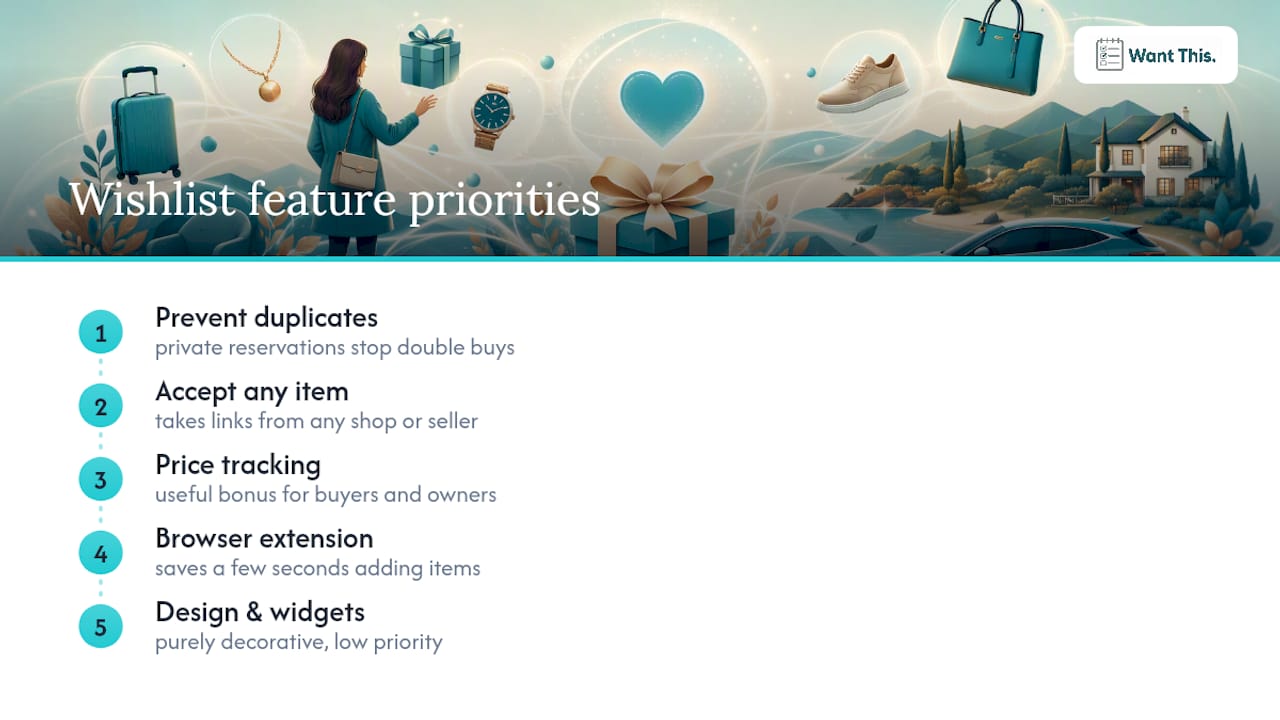
The conventional advice to “just use your retailer’s registry” falls down the moment a gift comes from a small independent shop, a marketplace seller, or isn’t a physical product at all. A universal list that takes any link is simply more useful across a normal mix of birthday, wedding and Christmas gifting than a single-store list ever will be.
If you take one thing from this article, prioritise the reservation feature over anything else. Price tracking is a nice bonus. A browser extension saves you a few seconds per item. But a list without private reservations will, sooner or later, produce a duplicate gift, and that’s the one mistake every guest notices.
— Stuart
Try Wantthis: build your free wishlist today
Wantthis is the free alternative to juggling registries, spreadsheets and group chats, add an item from any UK retailer by pasting its link, share one private link with friends and family, and let them reserve gifts without spoiling the surprise.

There’s no account required just to browse or gift, and no cost to create your own list. If you’ve got a birthday, wedding or Christmas coming up, start a free wishlist on Wantthis and add your first few items straight from your phone or the browser extension. Need inspiration first? The gift ideas across tech, home, beauty and more are worth a browse before you build your list from scratch.
Sources
FAQ
How do I share a wishlist with someone?
Create your list, set its privacy to shared or private, then copy the share link and send it by text, email or WhatsApp. Most platforms, including Wantthis, also support direct email invites if you’d rather control access more tightly.
What is the best app for sharing wish lists?
The best choice is a universal platform that accepts links from any retailer rather than one tied to a single store. Wantthis, for example, works this way and adds private reservation markers so gifts aren’t duplicated.
What website allows people to buy my wishlist?
Any wishlist platform with a share link lets guests view and buy items directly from the original retailer’s page. Wantthis pulls the retailer link straight from what you paste in, so buyers click through to the actual shop to purchase.
What is the best online wishlist app?
There’s no single universal answer, but the strongest options combine any-store item capture, private reservations and a browser extension for quick saving while shopping. Wantthis covers all three and adds price-drop tracking on top.
How do I share a wishlist privately without everyone seeing it?
Set the list’s privacy to private or invite-only rather than public, then share the link only with the specific people you want involved. On most platforms, including Wantthis, the list stays hidden from search and public browsing under this setting.